guides
Monitor Arm vs Monitor Stand: Which Should You Choose?
Monitor arms offer full adjustability and free up desk space; stands are cheaper and easier to set up. Here is how to pick the right one.
 Daniel Osei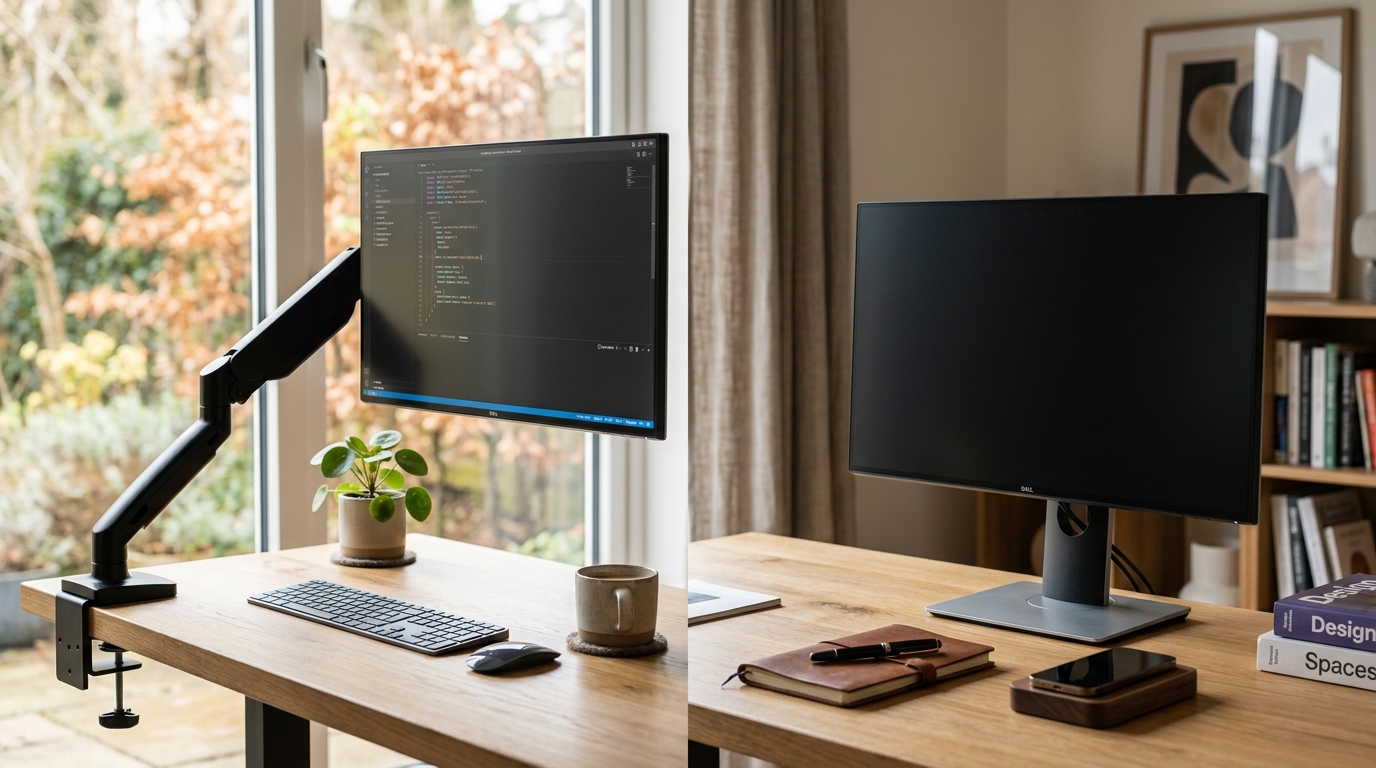
A monitor arm is the better ergonomic investment for most desk setups. It reclaims desk surface area, lets you dial in exact eye height and viewing distance, and integrates cable routing. A monitor stand is the right call when you want a cheaper, tool-free solution and rarely reposition your screen throughout the day.
Monitor arm vs monitor stand: key differences at a glance
| Product | Best for | Rating | Notes | |
|---|---|---|---|---|
| Desk space freed | Monitor arm | ★★★★★ | A monitor arm lifts the display completely off the desk on a single post, reclaiming the footprint of the stand base — typically 12-18 inches of depth. A monitor stand elevates the screen but its base still occupies desk real estate, often 12x6 inches or more. | — |
| Height adjustability | Monitor arm | ★★★★★ | Gas-spring monitor arms adjust height with one hand across a 13-20 inch range while the monitor stays horizontal. Monitor stands offer 3-6 inches of height adjustment at most, often through a fixed-step mechanism or riser blocks rather than continuous adjustment. | — |
| Tilt, pan, and swivel | Monitor arm | ★★★★★ | Monitor arms pivot left and right (pan), tilt the screen angle forward and back, and on most models rotate to portrait orientation. Monitor stands tilt the screen forward and back only; lateral movement requires repositioning the entire stand. | — |
| Installation ease | Monitor stand | ★★★★★ | Monitor stands require no tools — unbox, place on the desk, and set the monitor on or attach it via VESA plate. Clamp-style monitor arms require tightening a clamp to the desk edge and routing the arm, which takes 10-20 minutes and a screwdriver. | — |
| Price | Monitor stand | ★★★★★ | Good monitor stands start at $25-40. Quality monitor arms start at $40-80 for basic tilt-and-height models and $100-150 for full gas-spring arms like the Ergotron LX. Stands are accessible without meaningful investment. | — |
| Cable management | Monitor arm | ★★★★★ | Most monitor arms include integrated cable clips, channels, or a cable management spine that routes HDMI, DisplayPort, and USB cables out of sight along the arm. Monitor stands leave cables dropping from the monitor to the desk with no built-in routing. | — |
| Stability | Monitor stand | ★★★★☆ | Monitor stands sit solidly on the desk surface and do not move unless deliberately repositioned. Monitor arms can develop slight wobble with typing vibration, particularly on lighter monitors under 4kg or on arms that are overextended at full reach. | — |
| Dual monitor support | Monitor arm | ★★★★★ | Dual monitor arm models mount two screens on one clamp, managing both displays from a single footprint. Matching dual monitor stands exist but take up significantly more desk space and offer limited independent adjustment between the two screens. | — |
Why monitor arms are the better ergonomic choice
The defining advantage of a monitor arm is independent adjustment. With a quality gas-spring arm like the Ergotron LX, you can raise or lower the monitor, push it forward or back, tilt the screen angle, and pan left or right — all with one hand, without tools, in seconds. This matters more than it sounds.
Ergonomic positioning guidelines from OSHA and human factors research consistently point to the same setup: monitor top at or slightly below eye level, screen distance between 20 and 30 inches, slight downward tilt to align with the natural resting gaze angle. Achieving all three simultaneously with a fixed-height monitor stand requires getting lucky with desk height and monitor size. A monitor arm lets you dial in all three independently, and re-dial them any time your chair height or workstation changes.
The desk space recovery is equally significant. A typical monitor stand base occupies 10-15 inches of desk depth. Over a 60-inch wide desk, that is roughly 15% of your workspace permanently occupied by a mount. A monitor arm clamps to the desk edge and holds the screen in free space, returning that entire footprint to usable surface area. For desk setups with keyboards, notepads, documents, or secondary devices, this difference is immediately noticeable.
Cable management is the understated benefit. Monitor arms route HDMI, DisplayPort, and power cables along the arm structure and down the post, keeping the desk surface clean. Monitor stands leave cables dropping freely to the desk, requiring separate cable clips or accepting visual clutter.
For anyone who has spent years pushing a monitor stand to its height limit and still sitting too low or too high relative to the screen, an arm resolves that problem permanently with the first adjustment.
Where monitor stands make sense
Monitor stands are the right choice in two situations: when the budget is genuinely constrained, and when the setup is fixed.
If you work from a single location, have found your ideal monitor height through trial and error, and have no reason to reposition the display — a monitor stand priced at $30-60 delivers that positioning reliably without any installation work. You place it on the desk, mount or set the monitor, and you are done. There are no clamp compatibility questions, no desk-edge clearance issues, no arm length calculations.
Monitor stands also make sense on rental desks, shared workstations, or portable setups where the simplicity of pick-up-and-move matters. Removing a clamped monitor arm takes a few minutes of unscrewing; lifting a monitor off a stand takes seconds.
The VESA caveat applies to both options: many monitor stands use a cradle or platform that works with any monitor regardless of mounting holes, while arm-specific stands require VESA compatibility. If your monitor lacks VESA holes — which is increasingly rare but still happens on some ultrawide and curved displays — a platform-style stand is the simpler solution.
How to decide which type suits your desk setup
The decision comes down to three practical factors: how often you reposition, how much desk space matters to you, and whether you have existing neck or back strain.
Choose a monitor arm if you:
- Work 6 or more hours per day and want ergonomic height adjustment on demand
- Value desk surface area and want the monitor footprint eliminated
- Have neck pain, back pain, or eye strain that suggests your current monitor positioning is off
- Use dual monitors and want both displays managed from a single mount
- Want clean cable routing built into the mounting solution
Choose a monitor stand if you:
- Have a fixed, comfortable monitor height and rarely need to reposition
- Want the simplest possible installation with no tools required
- Are working with a budget under $40 and need a workable ergonomic improvement
- Work from a rental or shared desk where equipment needs to move easily
- Have a monitor without VESA holes that needs a cradle-style stand
Top monitor arm picks
Best for Best monitor arm overall
Ergotron LX Single Monitor Arm
The Ergotron LX is the benchmark for single-monitor arms. Its gas-spring mechanism supports monitors weighing 7 to 25 lbs across a height range of over 13 inches, adjusting with one hand while the screen stays level. The arm extends to 25 inches from the desk edge, retracts fully, pans 360 degrees, and tilts 70 degrees forward and 5 degrees back. Cable management channels run the full length of the arm. Available in clamp or grommet mount. Ergotron backs it with a 10-year warranty on the mechanism.
★★★★★ 5.0
Check current price on Amazon→Pros
- Gas-spring height adjustment across a 13-inch range without tools after initial setup
- Supports monitors from 7 to 25 lbs — covers virtually all 24-34 inch displays including ultrawide models
- Full 360-degree pan plus 360-degree rotation at the monitor mount allows portrait orientation
- Cable management channels route HDMI and DisplayPort cables cleanly along the full arm length
- 10-year warranty on the gas-spring mechanism from Ergotron — the strongest warranty in this category
Cons
- At $150-180 retail it is a meaningful investment compared to monitor stands or budget arms
- Initial tension calibration for the gas spring requires a hex key and a few test adjustments
- Clamp requires at least 2.5 inches of desk edge depth; very thin or beveled edges need the grommet mount version
Best for Best budget monitor arm
Amazon Basics Single Monitor Display Mounting Arm
The Amazon Basics monitor arm covers the core ergonomic use case at under $50. It supports monitors up to 27 inches and 17.6 lbs on a single-arm design with clamp mount. Height adjustment uses a friction-based mechanism rather than a gas spring, meaning repositioning requires loosening a tension knob, moving the arm, and retightening. Not as fluid as the Ergotron LX, but delivers genuine height range and left-right pan adjustment for users who set and hold their monitor position. VESA 75x75 and 100x100 compatible.
★★★★☆ 4.0
Check current price on Amazon→Pros
- Under $50 — dramatically cheaper than gas-spring arms while delivering real height and angle adjustment
- Supports 27-inch monitors up to 17.6 lbs, covering most common desktop display sizes
- Clamp mount included; no tools required for the clamp itself, only a screwdriver for VESA plate attachment
- Extends 15 inches from the pivot, adequate for most standard desk depths
Cons
- Friction-based adjustment requires loosening a knob to reposition — less fluid than a gas-spring mechanism
- Maximum 27-inch and 17.6 lb support excludes larger ultrawide or curved monitors
- No integrated cable management; cables drop freely from the monitor head to the desk surface
Top monitor stand picks
Best for Best monitor stand overall
VIVO Single LCD Monitor Standing Desk
VIVO produces some of the most reliable monitor stands at accessible price points. This single-monitor stand adjusts height in 1.6-inch increments from 3.9 to 8.7 inches above the desk, tilts the screen forward and back, and holds monitors with VESA 75x75 or 100x100mm patterns weighing up to 22 lbs. The base is compact relative to the screen support it provides, and the steel construction feels solid without the flex of cheaper plastic stands. Compatible with 13-27 inch monitors.
★★★★☆ 4.0
Check current price on Amazon→Pros
- Steel construction provides real stability without flex or wobble at the base
- Height range from 3.9 to 8.7 inches above the desk covers most seated ergonomic needs
- Compatible with VESA 75x75 and 100x100 patterns — works with the majority of monitors 13 to 27 inches
- Compact base footprint relative to screen support offered; does not consume excessive desk depth
- Under $40 — strong value for a durable, adjustable stand from an established brand
Cons
- Height adjustment is stepped rather than continuous — you choose from a fixed set of positions
- No pan or swivel; lateral repositioning requires moving the entire stand
- VESA mount required; monitors without VESA holes cannot use this stand without an adapter
Best for Best monitor stand for monitors without VESA holes
Fellowes Office Suites Monitor Riser
The Fellowes Office Suites riser uses a platform design rather than VESA mounting, making it compatible with any monitor regardless of whether it has standard mounting holes. The monitor simply sits on the elevated platform, which raises it 5 inches above the desk surface. The platform doubles as an under-monitor storage shelf, adding practical utility. A solid choice for monitors without VESA holes, all-in-one computers, or users who want a simple elevation solution without any attachment to the screen.
★★★★☆ 4.0
Check current price on Amazon→Pros
- Platform design works with any monitor — no VESA holes required, compatible with all-in-ones and unusual display shapes
- Under-monitor storage shelf adds practical utility for notepads, pens, or small accessories
- No tools and no assembly — place on desk, set monitor on platform, done
- Stable base with non-slip pads; does not shift during keyboard use
Cons
- Fixed height at 5 inches — no height adjustment once placed on the desk
- No tilt adjustment; screen angle is determined entirely by the monitor own tilt mechanism
- Platform footprint occupies the same desk space as the previous monitor stand base
What to skip
Inexpensive friction-joint monitor arms below $25 — typically sold by unbranded sellers with vague weight ratings — develop play in the friction joints within weeks of daily use. The arm drifts down over the course of a workday and requires constant retightening. At this price point, a quality monitor stand is a more reliable ergonomic improvement.
Monitor stands without height adjustment — fixed-height risers priced at $10-15 — make an ergonomic assumption that may not match your body or desk height. The risk is ending up with the monitor at exactly the wrong height with no practical way to correct it.
Dual-screen setups with mismatched mount types — one screen on an arm and one on a stand — create inconsistent viewing heights that are difficult to equalize. For dual monitors, commit to either two matching stands or a dedicated dual monitor arm.
FAQ
Frequently asked questions
Is a monitor arm worth it over a stand?
Do monitor arms fit all monitors?
Can a monitor arm damage my desk?
What is the correct monitor height with an arm or stand?
Do monitor arms wobble?
Can I use a monitor arm with an ultrawide monitor?
Bottom line
For most desk setups, a monitor arm is the better investment. The desk space recovery, continuous height adjustment, and integrated cable management deliver real ergonomic and practical improvements that a monitor stand cannot match. The Ergotron LX is the benchmark — at $150-180 it is the most reliable gas-spring arm available and backed by a 10-year warranty. If budget is a constraint, the Amazon Basics arm delivers genuine adjustability under $50.
Monitor stands earn their place for users who want zero-installation simplicity, portability, or compatibility with monitors lacking VESA holes. The VIVO stand is the best choice for VESA-compatible setups; the Fellowes riser serves monitors without mounting holes.
Whichever direction you go, pair the mount decision with proper screen height calibration — see our monitor height guide and how to set up dual monitors ergonomically. For deeper coverage of arm options, see best monitor arms and monitor arm for dual monitors. If you are still evaluating stands, best monitor stands covers the top options at every price point.