roundups
Best Dual Monitor Arms 2026 (Ergotron, HUANUO, Vivo)
The best dual monitor arms for side-by-side and stacked setups — Ergotron LX Dual, HUANUO, and Vivo compared on weight capacity and gas-spring quality.
 Daniel Osei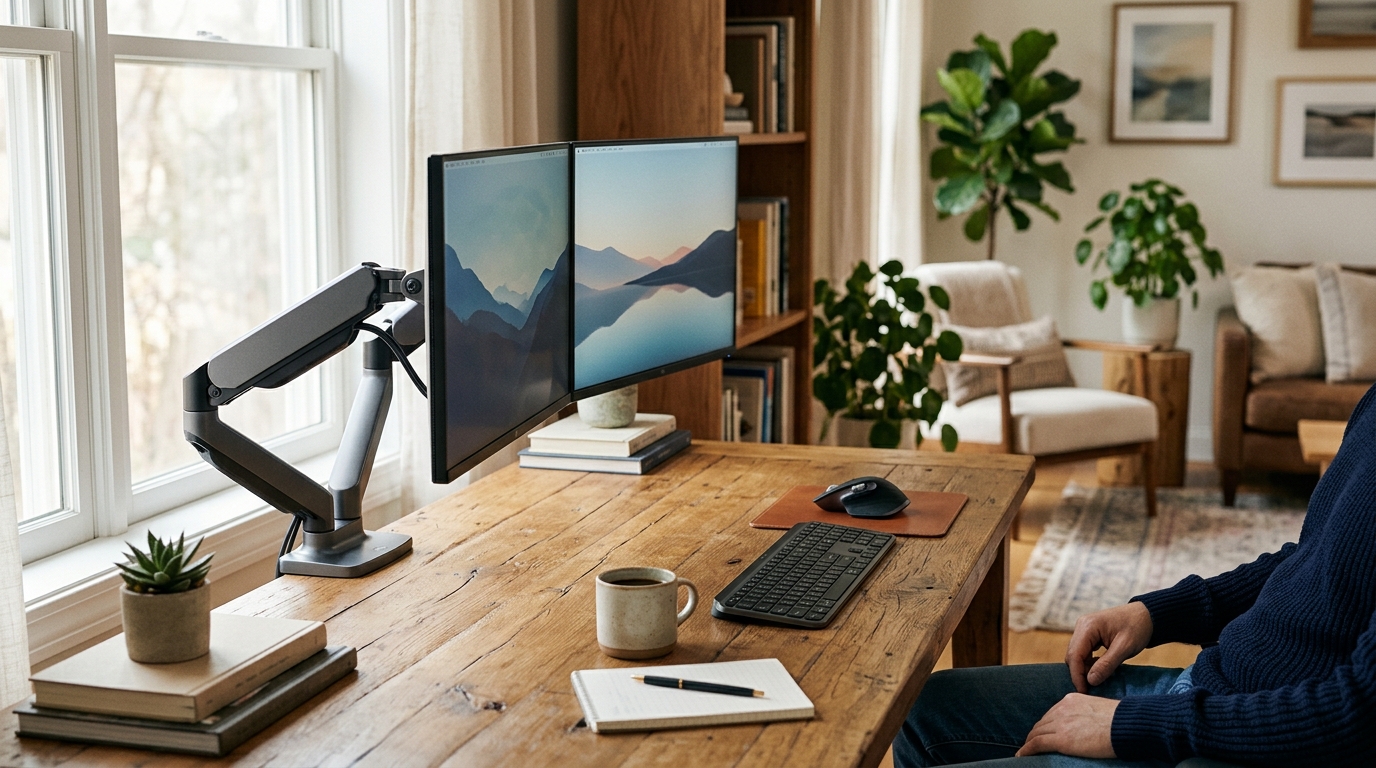
The Ergotron LX Dual (Side-by-Side) is the best dual monitor arm for most home offices: gas-spring on both heads, 7–25 lbs per arm, one clamp for two screens, and a 10-year Ergotron warranty. Budget shoppers get 80% of that performance from the HUANUO Dual at under $70. Skip any arm rated below 17 lbs per head — modern 27-inch monitors weigh 12–16 lbs, and most budget arms will sag and lose position within months under that load.
Side-by-side vs. stacked: which layout fits your workflow?
Two configurations dominate the dual monitor arm market, and choosing the wrong one is the most common mistake buyers make.
Side-by-side places both monitors at roughly the same height, arranged horizontally across the desk. This layout suits users who alternate between both screens throughout the day — developers who keep a browser and code editor open simultaneously, writers who reference notes while drafting, and anyone doing creative work where content moves between screens. The ergonomic trade-off is that the secondary monitor requires a slight neck turn (about 20–30 degrees) to view directly. Most people find this comfortable when the secondary screen is positioned immediately adjacent with no gap, angled slightly toward the viewer.
Stacked places one monitor directly above the other on the same pole. This layout works best when the two screens have clearly different roles: primary work area below (at normal eye level) and reference content above — documentation, Slack, a monitoring dashboard, or a trading feed. The upper screen sits above natural eye level by design, which is appropriate for reference viewing but fatiguing as a primary display. Stacked setups fit narrower desks that cannot accommodate side-by-side monitors without crowding.
A practical note on desk width: a side-by-side setup with two 27-inch monitors requires roughly 54–58 inches of desk width for comfortable placement. Two 24-inch monitors need 48–52 inches. If your desk is shorter than these widths, stacked or a single ultrawide monitor is a more ergonomic choice. See the dual monitor vs. ultrawide comparison for the full breakdown.
Quick comparison
| Product | Best for | Rating | Notes | |
|---|---|---|---|---|
| Ergotron LX Dual (Side-by-Side) | Best overall — gas-spring, 25 lbs per arm, 10-yr warranty | ★★★★★ | $280-340. Two gas-spring heads. One clamp. | Check price |
| Ergotron LX Dual (Stacked) | Best for vertical layout; same quality as side-by-side | ★★★★★ | $280-340. Same gas-spring arm heads, vertical config. | Check price |
| HUANUO Dual Monitor Arm | Best budget — gas-spring under $70 | ★★★★☆ | $55-70. Up to 17.6 lbs per arm. Aluminum alloy. | Check price |
| AmazonBasics Dual Monitor Arm | Best value mid-tier — 22 lbs per arm at $70-90 | ★★★★☆ | $70-90. Gas-spring. Up to 22 lbs per arm. | Check price |
| Vivo Dual Monitor Desk Stand | Cheapest freestanding option; no desk clamp needed | ★★★★☆ | $35-55. Spring-tension. Up to 17.6 lbs per arm. | Check price |
The picks
Best overall: Ergotron LX Dual (Side-by-Side)
Best for most dual-monitor home offices; gas-spring on both heads, 10-year warranty
Ergotron LX Dual Monitor Arm (Side-by-Side)
The Ergotron LX Dual is the dual-monitor arm that every serious ergonomics community recommends — and has for years. Both arm heads use Ergotron's proven gas-spring mechanism, meaning you press either monitor lightly in any direction and it holds position there without locking, clicking, or releasing tension. The shared pole requires one clamp point on your desk edge, and both arms route cables through internal channels on each head. At 7–25 lbs per arm it handles any pair of monitors up to 34 inches. The build is polished aluminum and steel — identical quality to the single LX — and Ergotron backs it with a 10-year warranty they actually honor. At \$280-340, it costs less than two individual single LX arms at full price.
★★★★★ 4.6 · 3,200 reviews
Check current price on Amazon→Pros
- Gas-spring on both heads — continuous, smooth positioning with light finger pressure
- Handles monitors up to 25 lbs each, covering all standard monitors up to 34 inches
- One clamp for two screens — smaller desk footprint than two separate single arms
- Integrated cable management channels on each arm head
- Available in black and silver
- 10-year warranty from a company that actually honors returns and replacements
Cons
- $280-340 is the premium tier — roughly double the HUANUO budget option
- Minimum 7 lbs per arm — very lightweight monitors may not hold position cleanly
- Side-by-side configuration only; stacked layout requires the separate LX Dual Stacked model
- Heavier and more complex to set up than budget arms; takes 30-45 minutes to install correctly
Best for stacked layouts: Ergotron LX Dual (Stacked)
Best for coders, traders, and power users who want one screen directly above the other
Ergotron LX Dual Stacked Monitor Arm
The stacked version of the LX Dual places both monitors on the same vertical pole, one above the other. The setup works best when the lower screen is your primary work surface — code editor, writing application, main workflow — and the upper screen holds reference material that you glance at rather than work in continuously: documentation, Slack, a second browser, or a monitoring dashboard. Both arm heads use the same gas-spring mechanism as the side-by-side model, so either monitor can be repositioned smoothly at any time. The vertical arrangement fits on desks as narrow as 36 inches and keeps the full horizontal desk width open for other uses.
★★★★★ 4.6 · 1,100 reviews
Check current price on Amazon→Pros
- Fits on narrow desks — full horizontal width stays open for keyboard, mouse, and other items
- Gas-spring on both arms — same quality mechanism as the side-by-side version
- Clean single-pole footprint with both screens routed to one clamp point
- Ideal for code/documentation, trading dashboards, or any workflow with clear primary vs reference roles
Cons
- Upper monitor sits above normal eye level — best used as a reference display, not primary workspace
- Less common configuration than side-by-side; fewer third-party setup guides available
- Not the right layout if both monitors are used equally throughout the workday
- Reaching the upper monitor to adjust it physically is slightly awkward
Best budget: HUANUO Dual Monitor Arm
Best for budget buyers who want real gas-spring performance without the Ergotron price
HUANUO Dual Monitor Arm
HUANUO is one of the few dual monitor arms under \$70 to include genuine gas-spring mechanisms on each head — the feature that separates smooth hold-anywhere positioning from the frustrating click-locking of spring-tension budget arms. At 17.6 lbs per head it handles most 24- and 27-inch monitors. The construction uses aluminum alloy rather than the pressed steel sheet found in cheapest arms, which meaningfully improves rigidity over a few years of daily use. Cable management runs through each arm. For buyers choosing between the HUANUO and the Ergotron: the HUANUO is the right choice if you plan to upgrade your setup within 3-5 years; the Ergotron is the right choice if you want a 10-year purchase and have the budget.
★★★★☆ 4.4 · 8,700 reviews
Check current price on Amazon→Pros
- Gas-spring mechanism at under $70 — uncommon in this price range for dual arms
- Handles up to 17.6 lbs per arm, covering most 24-27 inch monitors
- Aluminum alloy construction — stronger and more rigid than thin-steel budget arms
- C-clamp and grommet mount hardware both included
- Full rotation, tilt, and swivel on each head — same range as Ergotron
Cons
- Maximum 17.6 lbs per arm — 32-inch monitors or heavy gaming displays may exceed this
- Cable management is functional but less refined than Ergotron routing channels
- Gas-spring feel is slightly stiffer than the Ergotron LX — more resistance to reposition
- Shorter warranty and less consistent customer support than Ergotron
Best value mid-tier: AmazonBasics Dual Monitor Arm
Best for users with 27-32 inch monitors who need 22 lbs per arm without the full Ergotron price
AmazonBasics Dual Monitor Arm
The AmazonBasics dual arm occupies the space between HUANUO and Ergotron LX: \$70-90, gas-spring on both heads, and a higher per-arm weight rating of 22 lbs — enough to handle any 27-inch monitor and most 32-inch displays comfortably. AmazonBasics' quality control is more consistent than generic brands, and the gas-spring feel is smoother than the HUANUO. It lacks Ergotron's build polish and warranty backing, but for a 5-year purchase it represents better value than the HUANUO for anyone running heavier 27-32 inch monitors.
★★★★☆ 4.3 · 4,300 reviews
Check current price on Amazon→Pros
- Handles up to 22 lbs per arm — covers 27 and most 32-inch monitors with weight margin
- Gas-spring mechanism at a mid-tier price point
- More consistent quality control than generic brands
- Fits standard C-clamp and grommet mounting
Cons
- Not as refined as Ergotron LX build quality or cable management
- Shorter arm extension reach than the Ergotron LX
- Limited color options — usually black only
Ergonomic monitor placement for dual-screen setups
Getting the physical setup right matters as much as choosing the right arm. These four principles prevent the neck and shoulder strain that poorly placed dual monitors cause.
Primary monitor position
Place your primary monitor directly in front of you. The TOP edge of the screen — not the center, the top — should sit at your natural eye level when seated in correct posture. Most people instinctively place the center at eye level, which positions the screen 4–6 inches too high and forces sustained neck extension. After an hour, that angle creates cumulative strain at the base of the skull and upper trapezius.
Secondary monitor position
The secondary monitor should sit immediately adjacent to the primary with no gap between screens. Angle it 20–30 degrees toward you — do not leave it flat-forward. This small angle reduces the neck rotation required to look at it directly. The height should match the primary monitor so your gaze moves laterally rather than diagonally when switching screens.
Viewing distance
Both monitors should be at arm’s length, approximately 22–28 inches from your eyes. If the secondary monitor is noticeably farther back — common in side-by-side setups where the monitor is pushed against the wall — you will lean forward to read it, creating progressive spinal compression over a workday.
Cable management with dual arms
Dual arms create twice the cable challenge of a single arm. Use the arm’s internal cable channels for the display cable and power brick cable. Run a cable tether or management sleeve along the pole to bundle both arms’ cables together before they reach the desk surface. Attaching everything to the pole keeps the desk clear even when monitors are repositioned.
For a detailed step-by-step on monitor positioning, see the how to set up dual monitors ergonomically guide.
Weight capacity: the spec that kills most budget dual arms
The per-head weight rating is the most misunderstood specification in the dual monitor arm market. Buyers often check the total system rating (e.g., “holds up to 44 lbs combined”) without checking the per-head rating, which may only be 17.6 lbs each.
Monitor weights by category:
- 24-inch standard monitor: 7–10 lbs
- 27-inch standard monitor: 10–14 lbs
- 27-inch gaming (thick bezels, curved): 12–17 lbs
- 32-inch standard monitor: 14–18 lbs
- 32-inch curved gaming or ultrawide: 16–22 lbs
An arm operated at its maximum rated load sags faster and holds position with less precision. For clean, lasting gas-spring performance, use an arm whose per-head rating exceeds your monitor weight by at least 25–30%. A 15-lb monitor on a 17.6-lb-rated arm is at 85% capacity — sag and drift are likely within 18–24 months. The same monitor on the Ergotron LX Dual (rated to 25 lbs) is at 60% — the arm will hold position cleanly for 10+ years.
What to skip
Spring-tension dual arms under $40. These use spring clicks to lock the monitor at preset angles rather than gas-spring continuous positioning. The click mechanism wears out. Within 6–12 months, the monitor position drifts between clicks, and readjusting requires manually lifting the arm. The Vivo dual freestanding stand is the most common example — it works on day one and becomes frustrating over time. Avoid.
Any arm rated below 17 lbs per head if you use 27-inch monitors. Check your specific monitor model’s weight in its specification sheet (not the box estimate) before buying. Gaming monitors and curved displays are consistently heavier than their screen-size suggests. A 27-inch Alienware gaming monitor, for example, weighs 17.7 lbs — just above the HUANUO’s limit.
Freestanding poles with oversized bases if you have limited desk depth. Freestanding dual arm stands avoid the need for a clamp, but their base occupies 8–12 inches of desk depth permanently. For most desks, the clamp-mounted version (Ergotron LX Dual or HUANUO) is more space-efficient and more stable under movement.
FAQ
Frequently asked questions
Can one clamp really hold two monitors safely?
Side-by-side or stacked — which is more ergonomic?
Do both monitors need to be the same size?
What desk edge thickness works with a dual monitor arm clamp?
How is a dual arm different from buying two single arms?
Bottom line
Best overall: Ergotron LX Dual (Side-by-Side) — gas-spring, 25 lbs per arm, 10-year warranty, one clamp. Best stacked: Ergotron LX Dual (Stacked) — same quality mechanism in a vertical layout for coders and traders. Best budget: HUANUO Dual — genuine gas-spring at under $70. Best value step-up: AmazonBasics Dual — 22 lbs per arm for users with heavier 27–32 inch monitors.
Skip spring-tension arms entirely. The $20-40 they save costs you daily frustration and progressive sag within the first year.
Complete the dual-monitor workstation: single and dual monitor arms overview for comparison with single-arm alternatives, how to set up dual monitors ergonomically for the full positioning walkthrough, dual monitor vs. ultrawide monitor if you are still deciding between setups, or the two-monitor ergonomic setup guide for the complete workstation picture.