guides
Microsoft Natural Ergonomic Keyboard 4000 Review (2026)
Is the Microsoft Natural Ergonomic 4000 still worth buying in 2026? Full review: wave-split design, ergonomic credentials, and better modern alternatives.
 Daniel Osei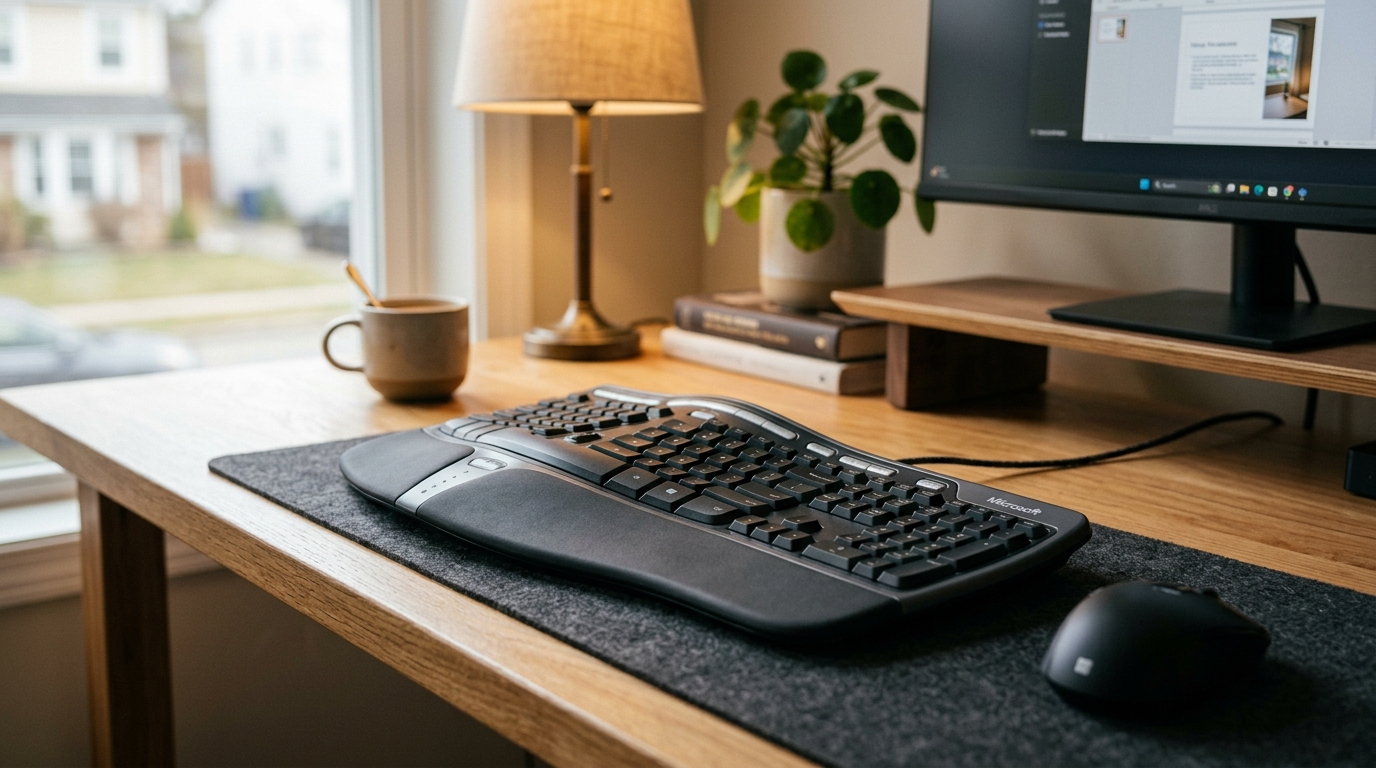
The Microsoft Natural Ergonomic Keyboard 4000 is discontinued but still found refurbished for $20–50. Its fixed-split wave design, thick cushioned palm rest, and rare negative-tilt kickstands make it genuinely ergonomic — but wired-only connectivity, Windows-only key labeling, and unreliable availability in 2026 mean most buyers should go directly to the modern Microsoft Ergonomic Keyboard instead.
What is the Microsoft Natural Ergonomic Keyboard 4000?
The Microsoft Natural Ergonomic Keyboard 4000 is a full-size wired ergonomic keyboard launched in 2007 and manufactured until approximately 2019. It represents Microsoft’s second-generation ergonomic keyboard design after the original Microsoft Natural Keyboard of 1994, and for over a decade it was the default recommendation for office workers seeking a genuine ergonomic upgrade from a flat keyboard.
The key specifications:
- Layout: Fixed-split curved, full-size QWERTY with numpad
- Connection: USB-A wired (PS/2 adapter included on early units)
- Palm rest: Integrated leather-wrapped cushioned foam
- Switches: Membrane, approximately 45g actuation, 3.5mm travel
- Tilt: Negative-tilt kickstands at the front edge (ergonomically correct)
- Extra controls: Zoom slider, back/forward/favorites media buttons, F-lock key
- Weight: Approximately 750g without cable
- Compatibility: Windows-primary; Mac-compatible but key legends are Windows-labeled
- Original retail price: $55–65
The design places the two key zones in a wave-curved fixed-split arrangement, permanently angled apart at roughly 17 degrees. The integrated palm rest lifts the wrists to key height and distributes pressure across the palm base rather than compressing the carpal tunnel against a hard desk edge.
The Natural 4000’s standout ergonomic feature: negative tilt
Most keyboards — including most modern ergonomic keyboards — offer only flat or positive-tilt positions. Positive tilt raises the back edge of the keyboard, angling the keys toward you. This is ergonomically counterproductive for most desk setups because it increases wrist extension during typing.
The Natural Ergonomic 4000 included front-edge kickstands that raised the near edge of the keyboard, tilting the keys away from the user. This negative tilt position — endorsed by occupational therapists and the same direction achieved by expensive under-desk keyboard trays — places the wrists in neutral extension rather than hyperextension during typing.
This single feature explains why the Natural 4000 accumulated a loyal following that still searches for refurbished units years after discontinuation. Very few keyboards at any price provide genuine negative tilt without requiring an aftermarket keyboard tray.
Who is the Natural 4000 for in 2026?
Buy a refurbished Natural 4000 if:
- You specifically need negative tilt from the keyboard itself without a keyboard tray
- You have a single Windows desktop and have no multi-device needs
- You find a clean unit for under $30 and want proven ergonomics for minimal outlay
Buy a modern alternative instead if:
- You need Bluetooth or multi-device switching
- You want reliable availability and warranty coverage
- You use a Mac as your primary machine
- You want USB-C charging instead of wired-only connectivity
How ergonomic is the Natural 4000?
1. Fixed-split wave layout. The two key zones are angled apart and curved in a wave pattern that angles the hands inward toward a neutral forearm position. This reduces ulnar deviation — the outward wrist angling that flat keyboards force on every typist. The reduction is real and meaningful, though not as complete as a true two-piece split keyboard.
2. Thick cushioned palm rest. The Natural 4000’s palm rest is wider and more deeply cushioned than most modern successors. The leather-wrapped foam is firm enough to support the wrist without sinking, and the height positions wrists at or just below key level — the ergonomically correct relationship. Many users who have tried both the Natural 4000 and its 2019 Microsoft successor consider the older keyboard’s palm rest superior.
3. Negative-tilt kickstands. As described above, these allow the keyboard to sit tilted away from the user at approximately 7 degrees — the correct tilt for neutral wrist extension. This is the Natural 4000’s most differentiated ergonomic feature and the primary reason its design has aged well.
4. Membrane switches at 45g. Lower actuation force than the 60–70g stiff dome keyboards common in offices means lower cumulative keystroke load on wrist tendons across a full workday. The membrane feel is not as satisfying as mechanical switches but is appropriate for the ergonomic use case.
The Natural 4000’s ergonomic limitations: it does not tent (inner edges cannot be raised for forearm rotation correction), and the single fixed-split angle does not suit users who need wider or narrower key-zone placement than the built-in 17-degree separation.
Can you still buy the Natural 4000 in 2026?
Microsoft discontinued the Natural Ergonomic Keyboard 4000 circa 2019. New units are no longer manufactured. In 2026, options include:
- Amazon renewed listings: Amazon Renewed offers certified refurbished units, typically $25–45. Quality varies; check seller ratings and return policy.
- Third-party marketplace listings: eBay and other marketplaces carry used and new-old-stock units, sometimes at inflated prices. Inspect photos carefully for cable wear and yellowing.
- “New old stock” from specialty sellers: Occasionally available $55–80, but at that price a new Microsoft Ergonomic Keyboard is a better buy.
Expect a working refurbished unit to be available for another few years, but supply will eventually dry up as the installed base ages out.
Natural 4000 vs. modern alternatives
| Product | Best for | Rating | Notes | |
|---|---|---|---|---|
| Microsoft Natural Ergonomic 4000 | negative tilt without a keyboard tray | ★★★★☆ | Discontinued. Refurbished $20-50. Wired USB only, Windows-primary, full-size with numpad. | Check price |
| Microsoft Ergonomic Keyboard (2019) | best direct successor — modern connectivity | ★★★★☆ | $50-70 new. USB wired + USB hub. Same wave-split concept, drops negative-tilt kickstands. Windows and Mac compatible. | Check price |
| Microsoft Sculpt Ergonomic | best wireless on a budget | ★★★★☆ | $80-110. Wireless 2.4 GHz, detached numpad, similar wave curve. AA batteries, single device only. | Check price |
| Logitech ERGO K860 | best wireless multi-device ergonomic | ★★★★☆ | $100-130. Bluetooth 5.0, 3-device switching, USB-C rechargeable, cushioned palm rest. | Check price |
| Logitech Wave Keys | slimmest wireless option with backlight | ★★★★☆ | $60-80. Lighter build, adds backlight. Less pronounced palm rest than K860 or Natural 4000. | Check price |
Natural 4000 vs. Microsoft Ergonomic Keyboard (2019)
The 2019 Microsoft Ergonomic Keyboard is the closest modern successor to the Natural 4000. It shares the fixed-split wave philosophy and integrated palm rest. The differences: the modern keyboard adds a built-in USB hub (two USB-A ports for charging or peripherals), uses a standard USB-A cable rather than an aging connector, and drops the PS/2 adapter. The major ergonomic regression is the loss of negative-tilt kickstands — the 2019 model offers only flat and positive-tilt positions. For users who specifically valued the Natural 4000’s negative tilt, the modern successor requires pairing with an aftermarket keyboard tray to replicate that benefit.
Natural 4000 vs. Logitech ERGO K860
The K860 is the better keyboard for multi-device wireless setups. Its three-device Bluetooth switching, USB-C rechargeable battery, and cross-platform Mac/Windows/iOS support address every connectivity limitation of the wired Natural 4000. The K860’s ergonomics are comparable — fixed-split wave layout, cushioned palm rest — though it does not offer genuine negative tilt either. If wired-only single-device use is acceptable, a refurbished Natural 4000 at $25–35 delivers similar ergonomics for significantly less money. If wireless flexibility matters, the K860 is the better long-term investment.
The verdict
Best for buyers who want the Natural 4000 design philosophy with modern availability and connectivity
Microsoft Ergonomic Keyboard (2019)
For anyone searching for the Natural Ergonomic 4000 in 2026, the 2019 Microsoft Ergonomic Keyboard is the sensible successor: same fixed-split wave layout, same palm rest concept, reliable new availability at $50-70, and added USB hub ports. The loss of negative-tilt kickstands is a genuine ergonomic downgrade, but for most buyers the modern manufacturing quality and warranty coverage more than compensate. If you already own a working Natural 4000, keep using it — but for new purchases, the modern Microsoft Ergonomic Keyboard is the right call.
★★★★☆ 4.3 · 6,100 reviews
Check current price on Amazon→Pros
- Fixed-split wave layout reduces ulnar deviation with no relearning period — same QWERTY layout as any flat keyboard
- Negative-tilt kickstands provide ergonomically correct tilt direction without a keyboard tray (Natural 4000 only)
- Thick leather-wrapped palm rest is among the most cushioned integrated rests ever made on a mainstream keyboard
- Wired USB connection is completely reliable with no battery to manage or wireless dropouts to troubleshoot
- Refurbished units are available for $20-35, delivering excellent ergonomics at a very low cost of entry
- Zoom slider and programmable media keys reduce mouse reach during document and browser navigation
Cons
- Discontinued since 2019 — availability is limited to refurbished and old-stock units with no warranty coverage
- Wired USB-A only — no Bluetooth, no multi-device switching, no wireless option of any kind
- Windows-centric key labeling — Mac users lose Command key legends and need to remap modifier keys manually
- No backlight — the keyboard is not usable in dim environments without memorizing key positions
- Membrane switches cannot be swapped or upgraded — no mechanical or hot-swap option
- Aging cable on used units can fray or fail — inspect carefully and replace with a standard USB-A cable if needed
What to skip instead
Flat keyboards marketed with “ergonomic wrist rests.” A gel wrist rest under a flat keyboard leaves the hands in full ulnar deviation for every keystroke. The wrist rest only addresses the pauses between keystrokes. The Natural 4000’s wave curve works during typing; a flat keyboard with a rest only works when you stop. These are not equivalent.
True split keyboards for casual discomfort. Keyboards like the ZSA Moonlander and Kinesis Advantage360 address severe RSI and clinical repetitive strain with fully programmable layouts, tenting, and column-stagger key arrangements. They come with a 2–4 week productivity penalty during the relearning period. For mild wrist fatigue from a flat keyboard, the Natural 4000 or its successors resolve the problem without that cost.
Cheap wired “ergonomic” keyboards under $25 new. Products branded as ergonomic keyboards at low prices typically have minimal split angles, minimal palm rest cushioning, and stiff switch actuation. The design elements that make the Natural 4000 ergonomically effective — the wave curve depth, palm rest thickness, and tilt options — are expensive to manufacture. Cheap alternatives skip them and deliver little ergonomic benefit.
FAQ
Frequently asked questions
Is the Microsoft Natural Ergonomic Keyboard 4000 still being made?
What replaced the Microsoft Natural Ergonomic Keyboard 4000?
Does the Microsoft Natural Ergonomic 4000 work on Mac?
Is the Natural Ergonomic 4000 good for carpal tunnel?
What is the negative tilt on the Natural Ergonomic 4000?
How much does a refurbished Natural Ergonomic 4000 cost?
Bottom line
The Microsoft Natural Ergonomic Keyboard 4000 is a genuinely well-designed ergonomic keyboard that has aged better than most of its contemporaries — its negative-tilt kickstands and thick palm rest remain features that modern successors have not fully replicated. For anyone who already owns one, continuing to use it is a sound choice. For anyone buying new in 2026, refurbished availability is uncertain enough that the modern Microsoft Ergonomic Keyboard at $50–70 is the safer investment.
For wireless flexibility and multi-device switching, move directly to the Logitech ERGO K860 review — it addresses every connectivity limitation of the Natural 4000 at a higher but reasonable price. If wrist symptoms persist on any fixed-split keyboard, see the best ergonomic keyboards roundup for true split options that provide more complete ulnar deviation correction.
Set up the keyboard correctly once you have it: the keyboard placement guide covers desk height, keyboard distance, and arm angle. Pair any ergonomic keyboard with guidance from how to type without wrist pain — position corrections that no keyboard alone can replicate — and address mouse-side discomfort with best ergonomic mice.