guides
Logitech ERGO K860 Review: Ergonomics Tested (2026)
Logitech ERGO K860 review: does the curved split design help wrist pain? Full ergonomic assessment with comparisons to Sculpt and MX Keys.
 Daniel Osei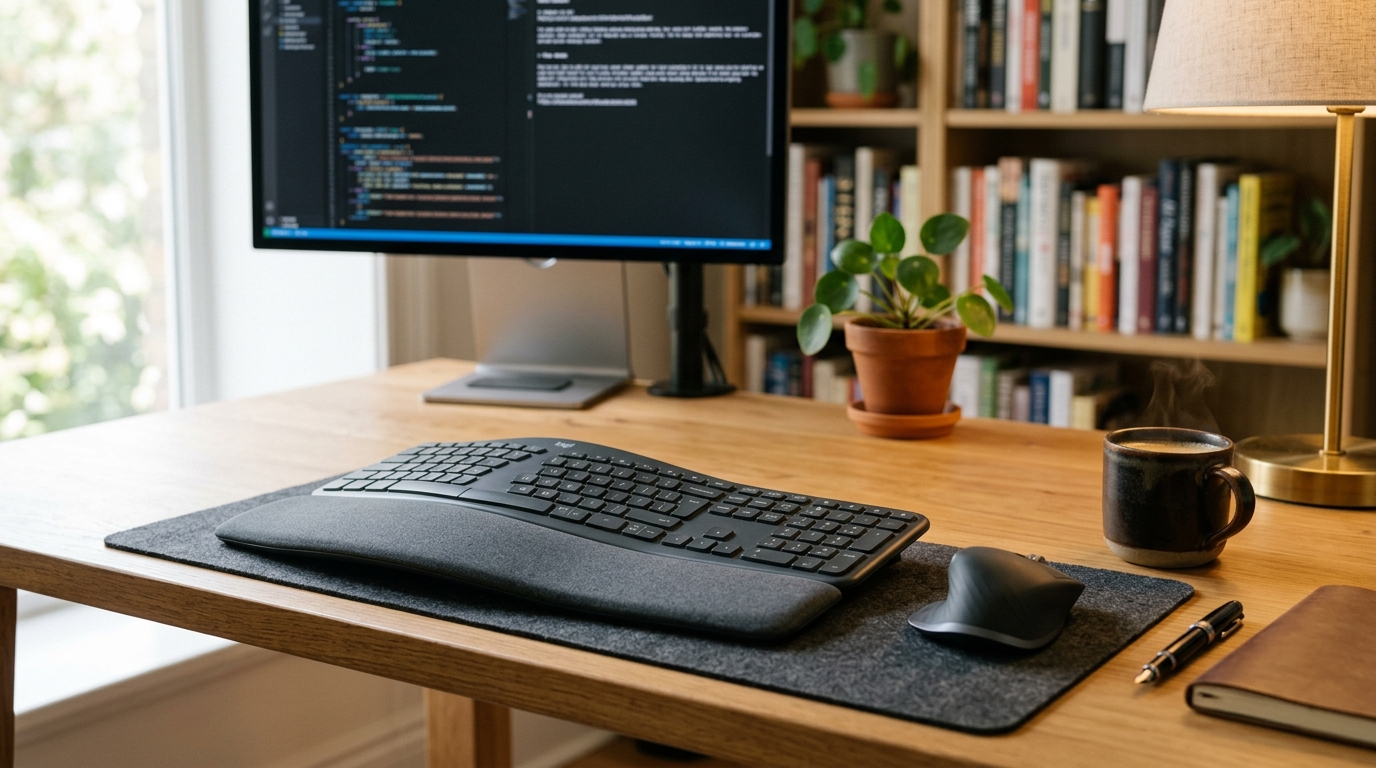
The Logitech ERGO K860 is the best ergonomic keyboard for most office workers making their first ergonomic upgrade — no learning curve, genuine wrist improvement. Its fixed-split curved layout reduces ulnar deviation, the built-in cushioned palm rest eliminates hard desk-edge compression, and seamless three-device Bluetooth switching works across Windows, Mac, iOS, and Android. At $100–130, it is the most complete entry-level ergonomic keyboard available.
What is the Logitech ERGO K860?
The Logitech ERGO K860 is a fixed-split wireless ergonomic keyboard launched in 2019 and still the flagship ergonomic keyboard in Logitech’s lineup. “Fixed-split” means the two key zones are permanently angled apart in a gentle wave shape — the halves are built into one chassis and do not physically separate the way they do on a true split keyboard like the ZSA Moonlander or Keychron Q11. The K860 ships with an attached cushioned palm rest, a Logi Bolt USB receiver, and connects to up to three devices simultaneously via Bluetooth 5.0 or the receiver.
Key specifications at a glance:
- Layout: Fixed-split curved, standard QWERTY
- Wireless: Bluetooth 5.0 + Logi Bolt 2.4 GHz USB receiver
- Multi-device: 3 devices, toggled via Easy-Switch keys
- Battery: Built-in rechargeable via USB-C, up to 4 months
- Switches: Low-profile membrane, approximately 45g actuation
- Palm rest: Integrated, cushioned foam-rubber
- Tilt: 3-position positive-only adjustment
- Weight: Approximately 1.2 kg
- Compatibility: Windows, macOS, iOS, Android, ChromeOS
- Price: $100–130 at retail
Who is the K860 best for?
The K860 fits a specific and very common profile: office workers or remote workers who type on a flat keyboard for four or more hours daily, feel wrist fatigue or early discomfort, and want ergonomic improvement without the 2–3 week productivity penalty of a column-staggered split keyboard.
The K860 is the right choice when:
- You want genuine ergonomic improvement over a flat keyboard but cannot afford slow typing during adjustment
- You work across multiple computers — a Mac and a PC, or a laptop plus a desktop — and need fast device switching
- You prefer a wireless, clean-desk setup with rechargeable battery rather than disposable cells
- Your wrist discomfort is mild to moderate; the K860 is a meaningful preventive and early-intervention tool
The K860 is the wrong choice when:
- You have diagnosed carpal tunnel syndrome requiring aggressive intervention — a true split with tenting addresses ulnar deviation and forearm pronation more completely
- You specifically want mechanical switches for tactile feedback or lighter actuation
- You need to achieve negative keyboard tilt without an additional keyboard tray
- You want a compact travel keyboard — at 1.2 kg with a fixed palm rest, the K860 is a dedicated desk keyboard
How ergonomic is the K860?
The K860 makes three genuine, measurable ergonomic improvements over a flat keyboard — and has real limitations worth knowing before you buy.
1. Reduced ulnar deviation. The wave-curve layout angles the two key zones inward toward the natural fall of the hands. This reduces the wrist-outward angling that flat keyboards force on every typist. The improvement is real but partial: a true split keyboard placed at shoulder width eliminates ulnar deviation entirely by removing the physical connection between the two halves. The K860 reduces deviation meaningfully — studies on similar fixed-curve keyboards measure 15–20 degrees of reduction — which is sufficient for mild discomfort but not for clinical repetitive strain injury.
2. Cushioned palm rest contact. The integrated foam-rubber palm rest eliminates the hard desk-edge contact during typing pauses that is one of the most consistent carpal tunnel aggravators. The rest is calibrated in height so that wrists sit at or just below key level — the ergonomically correct position. This alone accounts for a large share of the comfort improvement most K860 users report within the first week.
3. Quiet membrane switches at approximately 45g actuation. Lower actuation force reduces the cumulative keystroke load on wrist tendons compared to stiffer office dome keyboards at 60–70g. This is not as impactful as switch choice in a mechanical keyboard, where you can drop to 35g linear switches, but it is a measurable improvement over the stiff membrane boards the K860 typically replaces.
The real limits. The K860 does not tent — the inner keyboard edges cannot be raised to put forearms in neutral rotation. It does not support true negative tilt without an aftermarket keyboard tray. And its membrane switches cannot be swapped for a lighter or more tactile option. For users whose ergonomic needs exceed what a fixed-curve keyboard can address, these are not minor footnotes — they are the reason to skip the K860 and go directly to a true split.
Typing experience
The K860 uses low-profile membrane switches with approximately 45g actuation force and 3.2mm key travel — deeper than laptop scissor switches (1.2–1.5mm) but shallower than standard mechanical keycaps (4mm+). The feel is a smooth linear press with a soft bottom-out thud: no tactile bump, no audible click, no mechanical snap. Typists migrating from MacBook or scissor-switch laptop keyboards will find the K860 noticeably more comfortable and slightly more deliberate. Those coming from mechanical keyboards will find the membrane feedback a step down in tactile satisfaction.
At typical office typing speeds of 60–90 words per minute, the K860 does not feel like a limiting factor in throughput. The key spacing is standard full-size, and the wave curvature is gradual enough that finger muscle memory transfers immediately from a flat keyboard — most users report no meaningful adjustment period. Sustained typing across a full workday is comfortable with the palm rest supporting wrists between bursts.
Wireless performance via Logi Bolt is imperceptible at reported 1ms latency in laboratory conditions. Bluetooth latency runs slightly higher — around 7ms — which remains completely imperceptible during text input. The K860 is not a gaming keyboard and should not be evaluated as one; its wireless latency is appropriate for its use case.
K860 vs. the alternatives
| Product | Best for | Rating | Notes | |
|---|---|---|---|---|
| Logitech ERGO K860 | best overall — wireless, multi-device, no learning curve | ★★★★☆ | $100-130. Fixed-split curve, cushioned palm rest, USB-C rechargeable, 3-device Bluetooth. | Check price |
| Microsoft Sculpt Ergonomic | best under $100 — similar concept, separate numpad | ★★★★☆ | $80-110. Fixed-split curve, detached number pad. AA batteries only, 2.4 GHz dongle, single device. | Check price |
| Logitech Wave Keys | slimmer successor with backlight | ★★★★☆ | $60-80. Lighter and thinner than K860, adds backlight. Less pronounced palm rest. Good budget alternative. | Check price |
| Keychron Q11 Split | best mid-tier true split — row-staggered layout | ★★★★☆ | $220-280. True two-piece split, gasket mount, hot-swap mechanical switches. Wired only. | Check price |
| ZSA Moonlander Mark I | best for clinical RSI — fully split, tenting, programmable | ★★★★★ | $365. True split halves, adjustable tenting legs, QMK firmware. 2-3 week learning curve. | Check price |
K860 vs. Microsoft Sculpt Ergonomic
Both keyboards use a fixed-split curved layout with no physical separation. The Sculpt costs $20–30 less and includes a detached number pad — a genuine ergonomic advantage because it moves the mouse 4–5 inches closer, reducing right-shoulder reach extension. The Sculpt runs on AA batteries (not rechargeable USB-C), uses an older 2.4 GHz dongle (not Bluetooth), and pairs with only one device at a time. For single-machine users on a tighter budget, the Sculpt is the right pick. For multi-computer workers who want Bluetooth flexibility and rechargeable convenience, the K860 is the better long-term investment.
K860 vs. Logitech Wave Keys
The Wave Keys is Logitech’s newer and lighter fixed-split ergonomic keyboard, priced $20–50 below the K860. It adds backlight (the K860 has none), reduces weight with a slimmer chassis, and introduces a slightly gentler wave curve. The tradeoff is a shallower, less cushioned palm rest — which is where most of the K860 ergonomic benefit lives. For users who prioritize the palm rest depth and want the most cushioned option, the K860 wins. For users who prefer a lower-profile desk footprint, the Wave Keys is a reasonable downgrade.
K860 vs. true split keyboards
A true split keyboard places two independent halves at shoulder width, eliminating ulnar deviation entirely instead of reducing it partially. If you have persistent RSI symptoms that a curved fixed-split keyboard has not resolved after 6–8 weeks, or if you need tenting to address forearm pronation, a true split is the correct upgrade path. The Keychron Q11 at $220–280 is the gentlest true-split transition — it uses row-staggered layout identical to a standard keyboard, so finger muscle memory transfers directly, at the cost of wired-only connectivity. The ZSA Moonlander at $365 is the full ergonomic solution: adjustable tenting legs, fully programmable firmware, and a column-staggered layout with a 2–3 week relearning curve.
The verdict
Best for office and remote workers who type 4-8 hours daily and want real ergonomic improvement without a relearning period
Logitech ERGO K860
The K860 is the most polished no-compromise entry ergonomic keyboard available. The fixed-split curve and cushioned palm rest work immediately from day one. Multi-device switching across three computers via Easy-Switch keys is seamless and reliable. USB-C recharging lasts 4 months between sessions. The tradeoffs are real — membrane switches, no tenting, no true split — but for the target user who types all day on a flat keyboard and wants the wrist fatigue gone, the K860 removes that daily problem without asking for anything in return.
★★★★☆ 4.3 · 8,200 reviews
Check current price on Amazon→Pros
- Fixed-split curve reduces ulnar deviation immediately — standard QWERTY layout means no relearning
- Cushioned palm rest is the right height and density to eliminate hard desk-edge compression during pauses
- Multi-device: switch between 3 computers with a single keypress via Easy-Switch function keys
- USB-C rechargeable with up to 4 months per charge — no disposable battery replacement cost or inconvenience
- Works across Windows, macOS, iOS, Android, and ChromeOS via Bluetooth 5.0 or Logi Bolt receiver
- Quiet membrane switches are appropriate for shared office environments and reduce keystroke noise significantly
Cons
- Not a true split: fixed halves reduce ulnar deviation but do not eliminate it — insufficient for clinical RSI
- No tenting option: forearms remain in pronation; adds no forearm rotation correction
- Membrane switches only — no mechanical switch option, no hot-swap sockets, no tactile or clicky variant
- Positive tilt only: cannot achieve ergonomically ideal negative tilt without an aftermarket keyboard tray
- Heavy at 1.2 kg with a permanently attached palm rest — not portable and not suitable for travel use
- No backlight on the standard K860 — the Wave Keys variant adds backlight at a lower price point
What to skip instead
Standard flat keyboards from any brand. If wrist discomfort or early carpal tunnel symptoms prompted you to research ergonomic keyboards, a flat keyboard is the source of the problem. It forces wrists into ulnar deviation for every keystroke, compresses the palm against a hard desk edge during pauses, and provides no forearm support during active use. Returning to a flat keyboard after trying the K860 is a common experience users describe as immediately noticeable.
“Ergonomic-labeled” gaming keyboards. The ergonomic gaming keyboard category is almost entirely marketing. Curved bezels, built-in wrist rests that raise rather than support, and slight key-zone angles that do not meaningfully alter wrist deviation are the defining features. Verify any keyboard claiming ergonomic credentials by checking whether the key zones are genuinely split apart or merely shaped around a non-split layout.
Budget wireless combos under $40. Budget wireless sets prioritize component cost over ergonomics. Key zones are flat, actuation forces are stiff, and the included mouse is typically a symmetrical design with no wrist-neutral support. The additional cost of the K860 over a budget combo pays back quickly in reduced end-of-day wrist fatigue across months and years of daily use.
FAQ
Frequently asked questions
Is the Logitech ERGO K860 good for carpal tunnel?
Does the Logitech ERGO K860 work on Mac?
How does the K860 compare to the Logitech Wave Keys?
Can the Logitech ERGO K860 achieve negative tilt?
How long does the K860 battery last?
Is the K860 palm rest removable?
Bottom line
The Logitech ERGO K860 is the right first ergonomic keyboard for most office workers. The fixed-split curve, cushioned palm rest, USB-C rechargeable battery, and multi-device Bluetooth deliver genuine ergonomic value without demanding anything from the user in return. At $100–130 — less than a single physical therapy session for a wrist flare-up — the K860 is a cost-effective long-term investment for anyone who types for a living.
If symptoms persist after 6–8 weeks on the K860, step up to the best ergonomic keyboards for true split options including the Keychron Q11 and ZSA Moonlander, or read how to type without wrist pain for the technique corrections that no keyboard alone can replicate.
Complete the ergonomic setup: use the keyboard placement guide to position the K860 at correct desk height, pair it with best wrist rests for between-session support, and address mouse-hand discomfort simultaneously with the best ergonomic mice.