roundups
Best Desk Chairs With Footrest (2026)
Best desk chairs with footrest support reviewed: top picks for pairing with an under-desk footrest, plus chairs that include a built-in footrest.
 Daniel Osei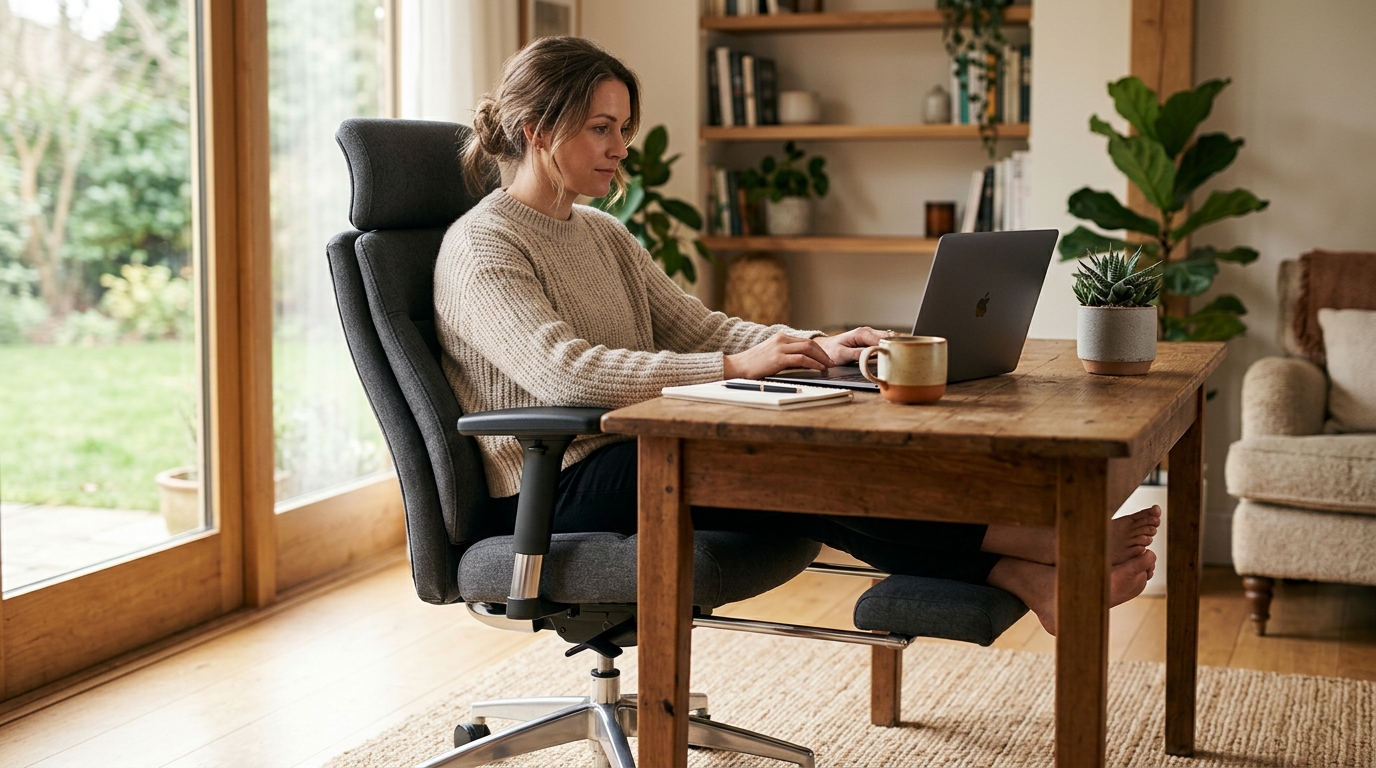
The best desk chair to pair with a footrest is the Steelcase Leap V2 — its fully adjustable lumbar and 4D armrests let a footrest do its job without fighting the chair. For a built-in footrest, the SIHOO ergonomic recliner with adjustable footrest is the most adjustable option under $400. Budget pick: the HON Ignition 2.0 pairs cleanly with any under-desk footrest for under $450.
Why footrest compatibility matters when choosing a desk chair
Most desk chairs are designed for a seated position with feet flat on the floor. When you add an under-desk footrest, you introduce a variable the chair was not engineered around: your feet are now 2 to 4 inches higher, which shifts your hip-knee angle and changes how the seat edge loads against the underside of your thigh.
Three problems follow, depending on the chair:
Fixed armrests are the most common obstacle. A footrest naturally shifts posture slightly forward and changes the angle at which arms reach the desk. If armrests cannot lower or flip out of the way, you compensate by hunching forward or raising your shoulders — which defeats the ergonomic purpose of the footrest entirely.
A hard seat front edge becomes a compression point when feet are elevated. Standard task chairs have a firm edge at the front of the seat. When feet rest on a footrest rather than the floor, more thigh weight transfers to that front edge, restricting circulation under the thigh. A waterfall seat edge (a gently curved front) or adjustable seat-depth slider moves the pressure point back to where it belongs.
Insufficient seat height range is the third issue. A footrest works when the chair sits 1 to 2 inches lower than the position that places feet flat on the floor. If the chair is already near the bottom of its height range at a standard desk, adding a footrest may push it below the functional minimum.
These three variables — armrest adjustability, seat edge design, and height range — are the filter to apply when choosing a desk chair specifically for footrest use.
How we picked
We evaluated chairs against five criteria weighted toward footrest compatibility:
- Armrest adjustability — 4D armrests (height, depth, width, pivot) score highest; height-only or fixed score low.
- Seat front edge — waterfall edge or adjustable seat-depth slider preferred over a hard flat edge.
- Seat height range — a lower minimum height (16 inches or below) gives more flexibility when adding a footrest.
- Lumbar support quality — the chair must maintain lumbar contact in the slightly-forward posture that footrest use can introduce.
- Built-in footrest quality (where applicable) — adjustability of angle, weight-bearing integrity, and whether partial deployment is possible.
Quick comparison
| Product | Best for | Rating | Notes | |
|---|---|---|---|---|
| Steelcase Leap V2 | best overall; optimal 4D arms and dynamic lumbar for footrest pairing | ★★★★★ | $1,100-1,500 new; $400-700 certified refurbished. Waterfall seat edge. 300-lb capacity. | Check price |
| SIHOO Ergonomic Chair With Footrest | best built-in footrest; angle-adjustable fold-out platform under $400 | ★★★★☆ | $280-380. Mesh back. Adjustable lumbar, headrest, and fold-out footrest. 265-lb capacity. | Check price |
| HON Ignition 2.0 | best budget under $450; waterfall seat edge and 4D arms standard | ★★★★☆ | $350-450. 4D armrests. Waterfall seat edge. 300-lb capacity. 12-year warranty. | Check price |
| Branch Ergonomic Chair | best for petite users; lowest minimum seat height at 16.5 inches | ★★★★☆ | $329-399. Seat height 16.5-21in. 4D armrests. Adjustable lumbar. 300-lb capacity. | Check price |
| Humanscale Freedom Chair | best for long hours; armrests pivot with the backrest during recline | ★★★★★ | $950-1,200. Waterfall seat. Weight-sensitive self-adjusting recline. | Check price |
The picks
Best overall: Steelcase Leap V2
Best for anyone who wants the most adjustable task chair for footrest pairing and plans to keep it a decade
Steelcase Leap V2 Ergonomic Office Chair
The Leap V2 is the chair most often specified by ergonomic consultants because every adjustment it offers is genuinely useful rather than a checkbox. The 4D armrests lower completely and rotate out of the way when you add a footrest, eliminating the shoulder compensation that undermines footrest ergonomics in chairs with limited arm adjustability. The LiveBack lumbar system flexes to match your spine shape rather than pressing a fixed pad against a fixed spine point — which means lumbar contact stays consistent even when posture shifts slightly forward on a footrest. The waterfall seat edge prevents thigh compression when feet are elevated. Buy certified refurbished to access Steelcase quality at half the new price; authorized refurb units come with a 2-year warranty and are mechanically identical to new.
★★★★★ 4.8 · 4,100 reviews
Check current price on Amazon→Pros
- 4D armrests lower and rotate completely out of the way — no armrest interference with footrest posture
- LiveBack lumbar flexes dynamically rather than pressing a fixed pad; maintains contact as posture shifts forward
- Waterfall seat edge prevents thigh compression when feet rest elevated on a footrest
- Seat height goes as low as 15.5 inches — wide enough range for footrest use at most desk heights
- Built for 10 to 15 years of daily use with a 12-year warranty covering the full frame
Cons
- New price of $1,100 to $1,500 is a major investment — certified refurbished cuts that by 40 to 50 percent
- No built-in footrest — pair with a separate under-desk footrest (see our best foot rests guide)
- Takes 15 to 20 minutes to dial in all adjustments correctly the first time
- Seat pan is medium-firm; users who prefer deep cushioning should sit in one before buying
Best with built-in footrest: SIHOO Ergonomic Chair With Adjustable Footrest
Best for users who want a single chair with an integrated footrest and mesh back cooling under $400
SIHOO Ergonomic Mesh Chair With Adjustable Footrest
SIHOO chairs consistently deliver adjustment features typically found at higher price points. Their ergonomic model with a fold-out footrest stands out because the foot platform adjusts angle rather than just deploying flat — which is a real functional difference for users who prefer feet slightly elevated rather than perfectly horizontal, and for anyone with circulation concerns. The mesh back keeps the chair cooler than fabric or leather options during long sessions. The full adjustment suite — height-adjustable lumbar, tilt-adjustable headrest, 3D armrests, and fold-out footrest — means it functions as a standard ergonomic desk chair and can transition to a partially reclined position with foot support. Weight capacity at 265 lbs is the one meaningful limitation compared to the Steelcase and HON options.
★★★★☆ 4.2 · 2,100 reviews
Check current price on Amazon→Pros
- Footrest adjusts angle — not just fold-out flat — better for circulation and personal preference
- Mesh back runs cooler than fabric or leather for warm-running users
- Full adjustment suite including adjustable lumbar height, tilt headrest, and 3D armrests in one chair
- Under $400 for built-in footrest functionality without a separate accessory purchase
- Works cleanly as a standard task chair when upright with the footrest retracted
Cons
- 265-lb weight capacity — lower than Steelcase (300 lbs) or HON (300 lbs)
- SIHOO warranty claims go through Amazon return — no US service network
- Mesh fabric stretches more than commercial-grade mesh over 2 to 3 years
- Footrest hinge is adequate for occasional use but is not rated as a primary all-day foot support
Best budget: HON Ignition 2.0
Best for users who want a proper ergonomic task chair for under $450 that pairs cleanly with any under-desk footrest
HON Ignition 2.0 Ergonomic Task Chair
HON has supplied commercial office furniture to US businesses since 1944. The Ignition 2.0 is their flagship ergonomic task chair, earning consistent marks from corporate facilities teams for matching most of the adjustability of $1,000-plus chairs at a fraction of the cost. The 4D armrests lower fully — solving the armrest-interference problem for footrest users — and the waterfall seat edge reduces thigh compression when feet are elevated. HON backs the Ignition 2.0 with a 12-year warranty matching Steelcase coverage at roughly a third of the price. If you are pairing a chair with a footrest on a budget, the Ignition 2.0 is the correct frame to start from.
★★★★☆ 4.4 · 3,200 reviews
Check current price on Amazon→Pros
- Under $450 with 4D armrests and a waterfall seat edge — the two most critical footrest-pairing features
- 12-year warranty matches Steelcase coverage at roughly one-third the price
- 300-lb weight capacity with a reinforced frame standard for commercial furniture
- Available in dozens of fabric colors and two base materials
- Widely available through office furniture dealers for try-before-buy testing
Cons
- Seat height minimum at 17 inches is higher than the Steelcase at 15.5 inches — limiting for shorter users adding a footrest
- Lumbar support is a fixed-height pad, not a dynamic system like the Steelcase LiveBack
- Less fine-grained adjustment overall for users with specific ergonomic prescriptions
- Cushioning is moderate in firmness; not a chair for users who need a plush seat
Best for petite users: Branch Ergonomic Chair
Best for users under 5ft 5in who need the lowest possible seat height to accommodate a footrest at standard desk height
Branch Ergonomic Office Chair
Branch entered the direct-to-consumer ergonomic chair market in 2019 and built a strong reputation among remote workers for honest quality at $329 to $399. The key advantage for footrest users is seat height: the Branch chair bottoms out at 16.5 inches versus 17 inches for the HON and 17.5 inches for most mid-range task chairs. That extra inch matters when you are shorter and adding a footrest pushes the required chair height below what a taller minimum allows. The 4D armrests and adjustable lumbar depth cover the basics, and the 300-lb capacity exceeds what the price suggests.
★★★★☆ 4.3 · 1,800 reviews
Check current price on Amazon→Pros
- Minimum seat height of 16.5 inches — the lowest in this roundup, critical for shorter users pairing a footrest
- 4D armrests adjust height, depth, width, and pivot for clean footrest-use arm positioning
- 300-lb weight capacity at a sub-$400 price point
- Assembles in under 20 minutes from a single box
- Adjustable lumbar depth and height for lower back support across recline angles
Cons
- No built-in footrest — pairs with a separate under-desk footrest accessory
- Mesh back has more stretch over a long lifespan than commercial-grade weaves
- Available direct and on Amazon only — no showroom access to test before buying
Best for long hours: Humanscale Freedom Chair
Best for users who sit 6 or more hours daily and want a self-adjusting recline that does not fight an under-desk footrest
Humanscale Freedom Ergonomic Office Chair
Humanscale designed the Freedom Chair around a weight-sensitive self-adjusting recline: the backrest counterbalances to your body weight, so the chair returns to the ideal reclined position without you manually adjusting tilt tension. For footrest users, the standout feature is armrest behavior — unlike most chairs where armrests stay fixed as the backrest leans, the Freedom armrests pivot with the backrest, keeping arms in the same relative position whether upright or reclined. This eliminates the forward reach that undermines footrest ergonomics in most recline-capable chairs. The waterfall seat edge is standard. At $950 to $1,200, this is a premium price, but for users logging heavy hours the consistent self-adjustment reduces the number of posture corrections needed across a workday.
★★★★★ 4.6 · 950 reviews
Check current price on Amazon→Pros
- Armrests pivot with the backrest — maintains arm position relative to the body during any recline angle
- Weight-sensitive self-adjusting recline removes the need for a tilt tension dial or lock
- Waterfall seat edge prevents thigh compression for footrest users across all recline positions
- Long-term durability with multiple fabric options backed by Humanscale US warranty service
- Humanscale maintains an authorized US dealer network for warranty claims and service
Cons
- $950 to $1,200 new — certified refurbished Steelcase Leap V2 is often a better value for similar performance
- Self-adjusting recline does not offer multiple lock positions — either reclined or upright
- Headrest costs extra and is sold as an optional add-on
- Fewer granular adjustment parameters than the Steelcase Leap V2 for users with specific ergonomic needs
What to skip
Chairs with fixed or height-only armrests. Any chair where armrests cannot at minimum lower to near the seat level or flip up is not a good footrest partner. Fixed armrests will either block natural arm positioning when using a footrest or force shoulder elevation to clear them. Avoid executive chairs with a permanently padded armrest bridge and no height mechanism.
Gaming chairs. Gaming chairs have a bucket seat that angles the pelvis backward, which is the opposite of what a footrest is trying to correct. Adding a footrest to a gaming chair typically results in feet propped too high relative to the hip angle the seat geometry creates, generating more lumbar strain than either piece alone.
Budget task chairs under $150 without seat edge curves. At this price point, the seat front edge is typically a flat, firm ledge of plywood covered in foam. When feet are elevated on a footrest, more weight transfers to that front edge. The compression on the underside of the thigh becomes noticeable within 30 minutes and worsens circulation over longer sessions.
Chairs where the lumbar is a removable pillow insert. Lumbar pillows work adequately when feet are flat on the floor and posture is upright. When a footrest shifts posture slightly forward, the lumbar pillow typically loses contact with the lower spine. Fixed contoured lumbar supports and dynamic lumbar mechanisms like the Steelcase LiveBack maintain contact across the posture range.
How to match a footrest to your desk chair
Once you select a chair, matching the footrest to it takes three steps:
- Set your chair height first. Sit and adjust until your thighs are parallel to the floor and forearms rest on the desk without shoulder elevation. Note the seat height.
- Measure your foot gap. With the chair set correctly, measure the distance from the floor to the soles of your feet. That gap is what the footrest needs to fill — typically 2 to 4 inches.
- Choose an adjustable footrest that covers the range. The best-reviewed under-desk footrests adjust from 2 to 5 inches of elevation. If your foot gap exceeds 5 inches, the underlying issue is likely that the chair needs to come down rather than the footrest go higher.
For matched recommendations, see our best footrests for under desk guide and the detailed footrest for under desk buying guide. The target outcome: feet flat on the footrest, knees at 90 to 100 degrees, hips at 90 to 95 degrees, forearms on the desk without shoulder shrugging.
FAQ
Frequently asked questions
Can any desk chair work with a footrest?
How high should a footrest be under a desk?
Are desk chairs with built-in footrests worth it?
Does using a footrest at a desk help with lower back pain?
What is the difference between a reclining office chair with footrest and a desk chair with footrest?
Bottom line
For most users: Steelcase Leap V2 — the 4D armrests, waterfall seat, and LiveBack lumbar make it the most compatible desk chair for pairing with an under-desk footrest, and it holds up for over a decade. Buy certified refurbished to cut the cost by half. For users who want a single chair with a built-in footrest: SIHOO ergonomic recliner with adjustable footrest under $400. On a strict budget: HON Ignition 2.0 delivers 4D armrests and a waterfall seat under $450 with a 12-year warranty.
See also: best foot rests for under desk, reclining office chairs with footrest, best ergonomic chairs, how to adjust your office chair.