guides
How to Improve Work from Home Productivity
Twelve targeted changes to your home office setup and daily structure that measurably improve focus, output, and sustained energy throughout the workday.
 Daniel Osei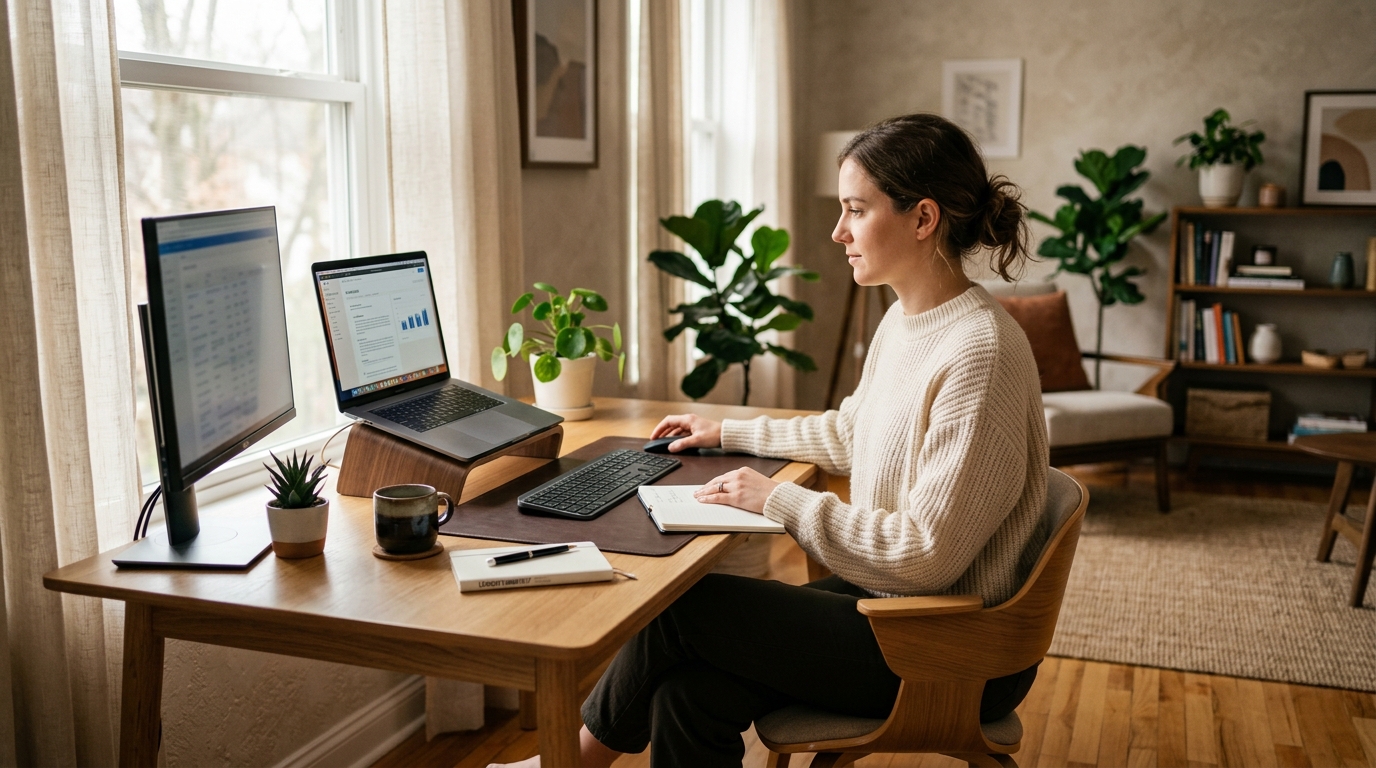
To improve work from home productivity: dedicate a fixed workspace, build an ergonomic setup that eliminates physical discomfort, control noise with headphones, structure your day into time blocks, and take regular movement breaks every 45 minutes. Those five changes resolve the most common causes of low output and lost focus in home offices — and most can be implemented today with no new purchases.
Why is work from home productivity different from office work?
Working from an office provides external structure: a commute that marks the start of work mode, visual separation from home environments, social accountability from colleagues nearby, and a physical space dedicated exclusively to professional output. Remove those scaffolds and most people notice their focus becomes variable — highly productive some days, scattered on others — without fully understanding why.
The good news is that each of those missing scaffolds can be reconstructed intentionally. A home office does not need to look like a corporate floor plan to support deep focus. It needs a few deliberate design choices that your brain associates with sustained, productive work. The steps below address the physical environment, ergonomic setup, and daily structure in the specific order that produces the fastest gains.
How to improve work from home productivity: 12 steps
Step 1: Dedicate a fixed physical workspace
Productivity research consistently shows that location-based habits form faster and persist longer than time-based habits. When the same chair, desk, and physical context are present every time you work, your brain begins associating that context with focused output — the same way a coffee shop or library shifts many people into productive mode. Returning to bed or the couch to work erases that association.
The space does not need to be a separate room. A dedicated corner with a desk and a chair pointed away from the living space functions well. What matters is that the location is used only for work — not meals, entertainment, or relaxation — so that contextual cues accumulate reliably.
If floor space is tight, a fold-down wall-mounted desk creates a dedicated workspace that disappears when you close it. That physical transition still signals the shift between work mode and home mode.
Step 2: Set up an ergonomic workstation — discomfort kills output
Physical discomfort is the most underrated productivity drain in home offices. Office furniture purchased for kitchens and dining rooms was not designed for eight hours of seated computer work. The resulting low-level neck tension, lower back stiffness, and wrist fatigue create a sustained cognitive load that reduces focus, accelerates mental fatigue, and makes sustained deep work progressively harder as the day goes on.
The four-point setup that resolves most ergonomic issues:
- Chair height: thighs parallel to the floor, feet flat. Hips set the foundation for everything above.
- Monitor height: top edge at eye level. Most home monitors sit far too low, creating neck strain that compounds over hours.
- Keyboard height: at or just below elbow level, so shoulders stay dropped and relaxed.
- Monitor distance: arm’s length from the screen (roughly 60-90 cm) with text readable without leaning forward.
These adjustments take ten minutes and cost nothing. They are also the most common source of productivity gains in home office setups where someone is fighting unexplained fatigue or difficulty concentrating after lunch.
Step 3: Control your light environment
Light is the primary regulator of circadian alertness. Bright, cool-temperature light (5000-6500K color temperature) in the morning and early afternoon boosts alertness and suppresses melatonin. Dim, warm light in the evening signals the brain to wind down — which is exactly what you do not want during an afternoon deep work session.
Position your desk perpendicular to any windows, not facing them or with windows directly behind you. Perpendicular placement captures the alertness benefit of natural light without creating glare on the screen or backlit silhouette problems on video calls.
If natural light is insufficient, a daylight-spectrum desk lamp (5000K+) placed to illuminate the workspace without shining directly into the screen adds the same alertness benefit.
Step 4: Eliminate noise — or make it work for you
Unpredictable noise — household conversations, traffic, appliances — is more cognitively disruptive than steady-state noise at the same volume. Each unpredictable sound event triggers an involuntary orienting response, which interrupts the working memory state needed for complex tasks.
Three approaches, roughly in order of effectiveness:
- Active noise-canceling headphones: the most reliable solution in shared spaces. Cancels low-frequency mechanical noise (HVAC, traffic, appliance hum) effectively; reduces but does not fully eliminate sharp transient sounds like voices.
- White or brown noise: masks unpredictable sounds with a steady-state audio environment. Brown noise (lower-pitched and warmer than white noise) is consistently rated as less fatiguing over long sessions.
- Dedicated quiet hours: if you have control over household schedule, blocking off the same two or three hours each day as non-interruption time creates predictable deep work windows.
Step 5: Build a startup ritual that marks the beginning of work mode
Without a commute, the transition into work mode is invisible. The brain has no clear before/after signal to shift states. A brief, consistent startup ritual provides that signal: a 5-10 minute sequence you perform in the same order before starting work every day.
Effective startup rituals are simple and repeatable. Examples:
- Brew coffee, open a notebook, write today’s three priority tasks, open the first task
- Walk around the block, return, sit at your desk, check calendar, open first task
- 10 minutes of reading (non-screen), sit at desk, review yesterday’s notes, begin
The content matters less than the consistency. After several weeks, completing the ritual reliably produces a shift in mental state — the way an athlete’s warmup prepares the nervous system for performance.
Step 6: Use time blocking instead of to-do lists
A to-do list tells you what needs doing; a time-blocked schedule tells you when you will do each thing. The difference matters for home offices because interruptions (household tasks, social media, procrastination) fill unscheduled time invisibly, while time-blocked slots resist casual interruption better because you can name what you are supposed to be doing right now.
Practical time-blocking for a knowledge worker:
- 90-minute focus blocks: one or two per day, reserved for the highest-cognitive-load work. Notifications off, headphones on, phone face-down.
- 60-minute shallow work blocks: email, meetings, administrative tasks, asynchronous communication.
- 15-minute transition buffers: between blocks, for processing notes, preparing the next task, and brief breaks.
Block these into a calendar rather than holding them in memory. A calendar entry behaves like a meeting commitment; a mental note does not.
Step 7: Take a movement break every 30-45 minutes
Sitting compresses lumbar intervertebral discs continuously. Those discs have no direct blood supply — they depend on alternating compression and decompression from movement to stay hydrated. After 45 minutes of uninterrupted sitting, disc hydration, spinal fluid circulation, and lower-limb blood flow all measurably decline. Cognitive performance tends to dip with them.
The fix is short and simple: 60-90 seconds of standing and light movement every 30-45 minutes. Walk to the kitchen, do a few shoulder rolls, take a short walk outside if possible. This is not a productivity interruption — it is the mechanical maintenance cycle the body requires to sustain performance through long work sessions.
A standing desk makes this habit automatic by prompting position changes without requiring you to leave the workspace. A phone timer accomplishes the same at zero cost.
Step 8: Separate communications from focused work
Email and messaging apps are designed to demand immediate attention. Responding to each notification as it arrives fragments work sessions into short intervals — research from the University of California, Irvine found that it takes an average of 23 minutes to fully return to a task after an interruption.
Batch communications instead. Close email and set your messaging app to do-not-disturb for 90-minute focus blocks. Check and respond in 30-minute batches two or three times per day. If your role requires genuine real-time availability, agree on a specific channel (a direct message, a phone call) for urgent matters that justifies interrupting focus.
Step 9: Set a clear end-of-day ritual
Without an office commute, work can bleed into evenings and weekends indefinitely. That boundary erosion degrades recovery quality and — paradoxically — reduces the next day’s productive output. Recovery, not willpower, is what sustains cognitive performance across a full week.
A simple end-of-work ritual: review what was completed, write tomorrow’s three priority tasks in a notebook, close all work applications, and physically step away from the workspace. If the workspace is in a shared room, a small physical cue (turning a desk lamp off, closing a laptop) marks the transition.
Step 10: Optimize your video call setup
An increasing share of home office time is spent on video calls. Poor call quality — bad audio, unflattering lighting, distracting backgrounds — creates subtle friction that compounds over many calls. It also projects a less professional image, which affects communication effectiveness with colleagues and clients.
Practical call improvements:
- Light: face a window or add a ring light. Backlit subjects are hard to read.
- Camera: position the camera at eye level (not looking up from a laptop bottom-edge camera). Eye-level cameras produce more natural, confident-looking video.
- Audio: a dedicated USB microphone produces dramatically better audio than any laptop microphone and is immediately audible in call quality.
- Background: a solid wall or simple bookshelf reads as professional and does not distract.
Step 11: Keep the desk surface clear at the start of each day
A cluttered desk surface creates low-grade visual distraction throughout the workday. Each irrelevant item on the desk is a potential attention-capture event. Clear desks also reduce the friction of starting new tasks — when the workspace is clean and organized, there is no search cost before beginning.
A minimal desk surface: monitor(s), keyboard, mouse, and whatever materials relate to the current active task. Everything else goes into drawers, a nearby shelf, or a desktop organizer out of direct line of sight.
Step 12: Invest in one high-impact piece of equipment
Not all equipment upgrades produce equal productivity gains. The items below have the largest documented impact on focus and output quality for knowledge workers — listed in rough order of ROI for most home office setups.
Equipment that moves the needle most
Best for shared home offices, open-plan spaces, and households with background noise
Sony WH-1000XM5 Noise-Canceling Headphones
The Sony WH-1000XM5 produces the most effective ANC available at its price point — blocking HVAC, traffic, and appliance hum that degrades focus across long work sessions. Multipoint Bluetooth lets it connect simultaneously to a laptop and phone. 30-hour battery life and a comfortable over-ear fit make it usable for full workdays. At around $300 (frequently on sale at $250), it is the single most impactful purchase for anyone working in a noisy home environment.
★★★★★ 4.7 · 28,400 reviews
Check current price on Amazon→Best for remote workers sitting 6-8 hours daily who want to interrupt sedentary time without leaving the workspace
Flexispot E7 Pro Height-Adjustable Standing Desk
The Flexispot E7 Pro is a dual-motor standing desk that adjusts height at 1.5 inches per second, supports up to 355 lbs, and fits a 48-72 inch desktop. Four programmable height presets mean changing positions is one button press, which dramatically increases how often people actually alternate between sitting and standing. For knowledge workers spending full days at a home desk, a standing desk is the most ergonomically significant upgrade after a proper chair.
★★★★★ 4.6 · 7,800 reviews
Check current price on Amazon→Best for raising a monitor to eye level and reclaiming desk surface space
Ergotron LX Desk Monitor Arm
The Ergotron LX is the benchmark monitor arm for home offices — smooth gas spring movement, a stable clamp mount, and height adjustment from 3 to 24 inches above the desk surface. It frees the footprint previously occupied by a monitor stand, cleans up cable routing, and — most importantly — allows quick repositioning so the monitor stays at the correct eye-level height as you alternate between sitting and standing. Compatible with most monitors up to 34 inches and 25 lbs.
★★★★★ 4.7 · 42,100 reviews
Check current price on Amazon→Best for improving video call lighting and adding adjustable-temperature task lighting
Elgato Key Light Air Desk Lamp
The Elgato Key Light Air provides soft, even frontal illumination that eliminates the harsh shadows and backlit-silhouette problems common in home office video calls. Color temperature (2900-7000K) and brightness are adjustable from an app — allowing bright, cool daytime lighting for alertness and warmer evening settings when the day winds down. Also functions as a high-quality work lamp when calls are not active. At around $100, it solves both the call lighting and general-illumination problems in one unit.
★★★★★ 4.5 · 9,200 reviews
Check current price on Amazon→Best for dramatically improving audio quality on video calls and voice recordings
Blue Microphones Yeti USB Microphone
Laptop microphones pick up keyboard noise, room echo, and HVAC hum that fatigues listeners and reduces call effectiveness. The Blue Yeti is a cardioid USB condenser mic that plugs in without drivers, sits on a desk stand, and produces broadcast-quality voice audio immediately. Its cardioid pattern rejects side and rear noise while capturing a clear, warm voice signal. At around $100, it is the fastest upgrade to call professionalism and reduces the cognitive friction of misheard audio.
★★★★★ 4.6 · 61,200 reviews
Check current price on Amazon→Biggest home office productivity mistakes
| Product | Best for | Rating | Notes | |
|---|---|---|---|---|
| Working from the couch or bed | Destroys location-based work context cues | — | Trains the brain to associate those locations with relaxation, making focus harder. Use a dedicated desk instead. | — |
| Leaving notifications on during focus blocks | Fragments attention into 5-15 minute intervals | — | Each notification creates an average 23-minute recovery cost. Batch-check during scheduled communication windows instead. | — |
| No movement breaks | Dehydrates lumbar discs and degrades afternoon performance | — | Set a recurring timer for 30-45 minute intervals. Stand and walk for 60-90 seconds — not optional for sustained output. | — |
| Starting work immediately on waking | Skips the mental transition into work mode | — | A brief startup ritual — coffee, task review, first task — creates a reliable context-switch that replaces the commute. | — |
| No designated end of workday | Prevents adequate cognitive recovery for the next day | — | A consistent shutdown ritual protects off-hours quality and sustains weekly output across months. | — |
FAQ
Frequently asked questions
What is the single most effective change for work from home productivity?
How do I stay focused working from home with family or roommates?
Is a standing desk worth it for work from home?
Why am I more tired working from home than in an office?
What is time blocking and how do I start?
How many hours of focused work can a person realistically sustain?
Bottom line
Most work from home productivity problems trace to three root causes: no clear physical separation between work and home context, an ergonomic setup that creates low-level discomfort and fatigue, and an unstructured day that lets interruptions fill the available time. All three are fixable without a major investment.
Start with a dedicated workspace and correct chair and monitor height. Add time blocking and batched communications. Layer in noise control, movement breaks, and a startup and shutdown ritual as habits form. The equipment upgrades — noise-canceling headphones, a monitor arm, a standing desk — amplify a foundation that already works. Buy gear after the habits are established, not instead of establishing them.
For more on the physical setup: how to set up an ergonomic workstation and how to reduce eye strain at a computer. For chair and posture specifics: how to adjust your office chair and how to improve posture at desk.