guides
How to Choose a Laptop Stand
Key criteria for picking the right laptop stand: height range, portability, material, compatibility, and what to skip at every price point.
 Daniel Osei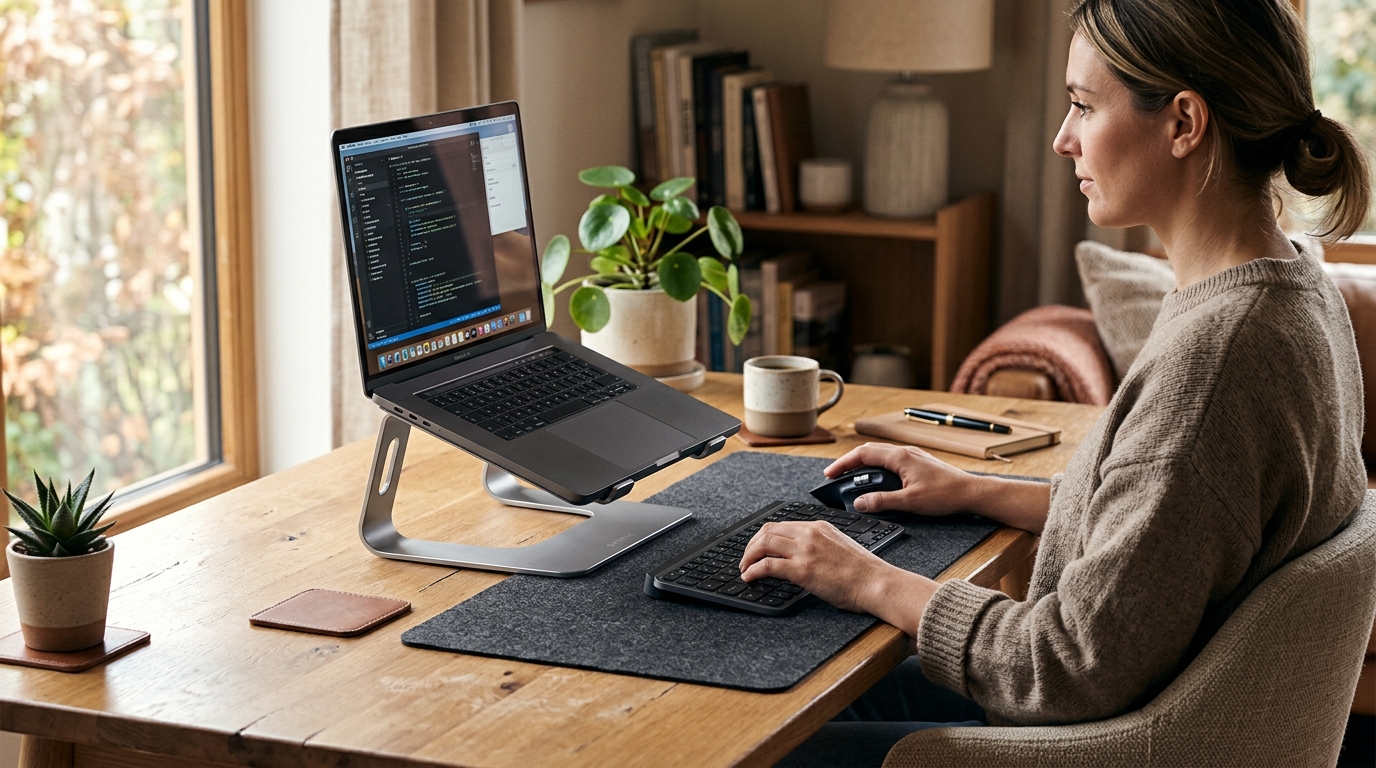
For a permanent desk setup, the Rain Design mStand ($43) or a similar fixed aluminum stand is the right choice — it raises the screen 6 inches, conducts heat away from the chassis, and needs no daily adjustment. For travel or multi-location work, a foldable adjustable stand like the Nexstand K2 ($35) fits in a backpack and sets up in 30 seconds.
Why a laptop stand changes the ergonomics of your entire workstation
Using a laptop flat on a desk forces the head into a downward tilt of 30 to 45 degrees for hours at a time. Research consistently links that posture with accelerated neck muscle fatigue, increased disc pressure in the cervical spine, and headaches that develop over weeks and months of daily use.
The fix is to raise the screen so the top of the display sits at or slightly below eye level with the head in a neutral upright position. For most adults at a standard 29 to 30-inch desk with an adjustable chair, that means raising the laptop 5 to 8 inches. A stand accomplishes that for $30 to $80 — one of the best ergonomic returns per dollar available for a home office setup.
The one constraint: once the laptop is elevated, the built-in keyboard drops to waist level, which strains wrists and forearms during extended typing. A laptop stand works as an ergonomic improvement only when paired with a separate keyboard and mouse positioned at elbow height. Budget for both at the same time.
The 5 criteria that determine which laptop stand to buy
1. Fixed vs adjustable height
Fixed-height stands hold the laptop at one set elevation and angle. The better fixed stands — Rain Design mStand, Twelve South Curve — place the screen at a height that suits most adults at standard desk and chair height without any setup. They are simpler, more stable, and quieter in appearance than adjustable alternatives. Fixed is the right choice for a permanent single-desk setup where the stand never moves.
Adjustable stands let you set the height and angle across a range. Three use cases justify the complexity: users who are significantly shorter or taller than average, workstations shared between two people, and setups that move between multiple locations. The trade-off is a locking mechanism that can loosen under frequent adjustment cycles over 12 to 24 months.
2. Portability
If the stand stays on one desk, portability does not matter. Buy the most stable, best-looking option in your budget and stop thinking about it.
If you carry the stand to meetings, co-working spaces, or split time between home and an office, weight and pack-down size matter. Foldable adjustable stands like the Nexstand K2 and Lamicall S1 collapse flat and weigh under 500 grams. They fit in a laptop bag without adding noticeable bulk. Fixed aluminum stands weigh 1.2 to 1.6 lbs and do not fold — excellent for a desk, awkward in a bag.
3. Build material
Aluminum is the premium choice. Aluminum conducts heat away from the bottom of the laptop, stays rigid under load without any flex, and holds its shape indefinitely. The downside is weight — aluminum stands are heavier than plastic alternatives.
Polycarbonate and ABS plastic covers most adjustable and budget stands. Quality varies widely. The better plastic stands use thick-wall construction with rubberized feet that grip the desk reliably. Thin-wall plastic stands flex noticeably under a heavier machine and develop creaks within 12 to 18 months of regular use.
Open mesh and steel combinations appear in ventilated stands designed for gaming laptops. The mesh maximizes airflow through the laptop bottom; the steel frame keeps the overall weight moderate. Less visually minimal than aluminum but well suited to machines that generate significant sustained heat.
4. Laptop size and weight compatibility
Most universal laptop stands accommodate 11 to 17-inch laptops and support weights up to 8 to 10 lbs. The majority of consumer laptops — MacBooks, Dell XPS, ThinkPads, Surface Laptops — fall well within those limits. Verify the specs before purchasing if you are placing a large gaming laptop on the stand: 17-inch gaming machines commonly weigh 6 to 9 lbs, and some budget stands are rated for only 6 lbs capacity.
Width stoppers and grip pads are what actually hold the laptop in position on the stand platform. Check that the stand uses rubber or silicone at every contact point rather than bare plastic. Bare plastic scratches aluminum laptop bodies within weeks of regular use.
5. Ventilation
For standard productivity work — web browsing, documents, video calls — a solid-surface stand does not meaningfully raise laptop temperatures. The primary airflow paths on modern thin laptops run laterally through the vents on the bottom edge, not straight down.
For sustained heavier loads — extended video exports, gaming sessions, code compilation runs — a stand that elevates the laptop with open air underneath improves ambient airflow and can reduce sustained temperatures by 2 to 4 degrees Celsius. If you regularly push sustained CPU or GPU loads for 30 minutes or longer, specify a ventilated mesh or open-bottom stand.
Price tiers and what you get
| Product | Best for | Rating | Notes | |
|---|---|---|---|---|
| Budget ($20-$35) | light use, occasional travel, shared desks with light laptops | ★★★★☆ | Plastic or thin aluminum construction. Functional lift with basic height adjustment. Rubber feet vary in quality. Fine for laptops under 5 lbs; can flex under heavier machines over time. | Check price |
| Mid-range ($35-$60) | daily use, travel, and most laptop sizes up to 15 inches | ★★★★☆ | Nexstand K2 and similar. Thick-wall aluminum alloy construction. Stable under load, folds flat, adjustable height range. Best overall value for daily-use adjustable stands. | Check price |
| Premium ($40-$80 fixed) | permanent desk setups where appearance and long-term stability matter | ★★★★★ | Rain Design mStand, Twelve South Curve. Single-piece aluminum, no moving parts, excellent thermal conductivity. Best fixed-height stands available at any price. | Check price |
Two picks for most buyers
Best for daily users who want adjustable height and a portable stand that folds completely flat
Nexstand K2 Laptop Stand
The Nexstand K2 is the best-value adjustable laptop stand for daily use. The aluminum alloy frame locks at six height positions between 15 and 26 cm, covering the full range of standard desk and chair combinations. It supports laptops up to 17 inches and 9 lbs without any flex at the base. The stand folds to 3 mm thick and weighs 370 grams — functionally flat in a laptop bag with no noticeable bulk. Rubber feet and silicone contact points protect both desk surfaces and laptop chassis from scratches. For users who sit at different desks across the week or share a workstation, the K2 is the most practical option at this price.
★★★★★ 4.5 · 12,400 reviews
Check current price on Amazon→Pros
- Six height positions from 15 to 26 cm cover virtually all desk and chair height combinations without guesswork
- Folds to 3 mm thickness and weighs 370 grams — fits in a laptop bag without adding noticeable bulk
- Aluminum alloy construction handles laptops up to 9 lbs without any flex or wobble at the locked position
- Silicone and rubber contact points at the base and front lip protect both desk surfaces and laptop chassis
- Compatible with 10 to 17-inch laptops, covering the full range of consumer and professional machines
Cons
- Height lock mechanism can loosen gradually after 12 to 18 months of frequent daily adjustment cycles
- No cable management or accessory integration — purely a lifting platform with no extra features
- The fold mechanism adds weight and mechanical complexity compared to a fixed-height aluminum stand
Best for permanent desk setups where you want single-piece aluminum construction with no moving parts
Rain Design mStand Laptop Stand
The Rain Design mStand is the benchmark for fixed laptop stands. Single-piece anodized aluminum raises the laptop to a fixed 6 inches — the right elevation for most adults at standard desk and chair height. There are no adjustment mechanisms to loosen or wear out over time. The solid aluminum surface conducts heat away from the laptop base, the rubber base pad keeps the stand completely stable on any surface, and the cutout at the back accommodates cable routing cleanly. For a dedicated home or office desk where the stand never moves, the mStand is the most reliable and cleanest-looking option at this price.
★★★★★ 4.7 · 18,500 reviews
Check current price on Amazon→Pros
- Single-piece anodized aluminum has no moving parts to loosen or fail — built to hold the same position indefinitely
- Aluminum thermal conductivity helps dissipate heat from the laptop base during sustained use
- Fixed 6-inch elevation positions the screen at eye level for most adults at standard desk and chair height
- Integrated cable routing cutout at the back keeps the desk visually clean without additional management
- Rubber base pad holds completely stable on wood, glass, or laminate surfaces without slipping or vibrating
Cons
- Fixed height may not suit users who are significantly shorter or taller than average without chair adjustment
- Does not fold — not suited for travel or multi-location use
- Only accommodates laptops up to 17 inches wide; some wider gaming laptops may not seat correctly in the channel
What to skip
Stands rated for less than 6 lbs. A modern 15-inch laptop commonly weighs 4 to 5 lbs. Add a protective case and you can exceed the rated capacity of many budget stands. Always check the spec sheet — never assume a stand marketed for laptops will hold yours under continuous load.
Stands with bare plastic contact surfaces. Bare plastic scratches anodized aluminum laptop bodies within weeks of regular use. Every contact point — the base platform and the front lip — should be silicone or rubber. Verify this in the product photos before purchasing. If the photos show bare plastic edges, move on.
Stands marketed as ventilated that do not specify airflow improvement. Many cheap stands add mesh cutouts or slot patterns that provide minimal actual thermal improvement, because they do not address the real airflow path through the lateral vents of the machine. If cooling is the primary reason for buying, look for brands that publish temperature testing rather than just using the word ventilated in the listing.
Stands with no front stop or side guides. A stand that holds the laptop only with friction — no physical lip at the front — can let the machine slide forward under vibration or during typing. Verify that the stand has a physical retaining stop at the base front edge, not just a grip surface.
Stands with maximum heights under 25 cm for tall users. A user 6 ft 2 in or taller at a 30-inch desk may need the screen raised 8 to 9 inches to reach true eye level. Verify the maximum height position against your own desk-to-eye measurement before ordering.
FAQ
Frequently asked questions
What height should a laptop stand raise the screen to?
Do I need a separate keyboard when using a laptop stand?
Can a laptop stand damage my laptop?
Is the Rain Design mStand worth the price compared to cheaper options?
What laptop stand is best for a gaming laptop?
Can I use a laptop stand with a 17-inch laptop?
Bottom line
Choose a laptop stand based on how you actually use it. If the stand stays on one desk and never moves, buy the most stable fixed-height aluminum stand in your budget — the Rain Design mStand at $43 is the standard. If you carry it between locations or share a workstation, buy a foldable adjustable stand that fits in your bag — the Nexstand K2 at $35 hits the right balance of stability and portability.
Whatever stand you choose, pair it with a separate keyboard and mouse at the same time. A stand without external input devices raises the screen while leaving the arms in an equally problematic position. That is half a workstation upgrade, not a full one.
For the full category comparison before buying, see the best laptop stands roundup and how to set up a laptop workstation for keyboard placement and monitor positioning guidance. Once everything is in place, monitor height guide covers the exact measurements for positioning any display at eye level, and how to set up an ergonomic workstation ties all the components together into a complete ergonomic desk setup.