roundups
Best Ergonomic Desk Setup 2026
Top picks for building a complete ergonomic desk setup: chair, sit-stand desk, monitor arm, keyboard, and mouse for all-day comfort.
 Daniel Osei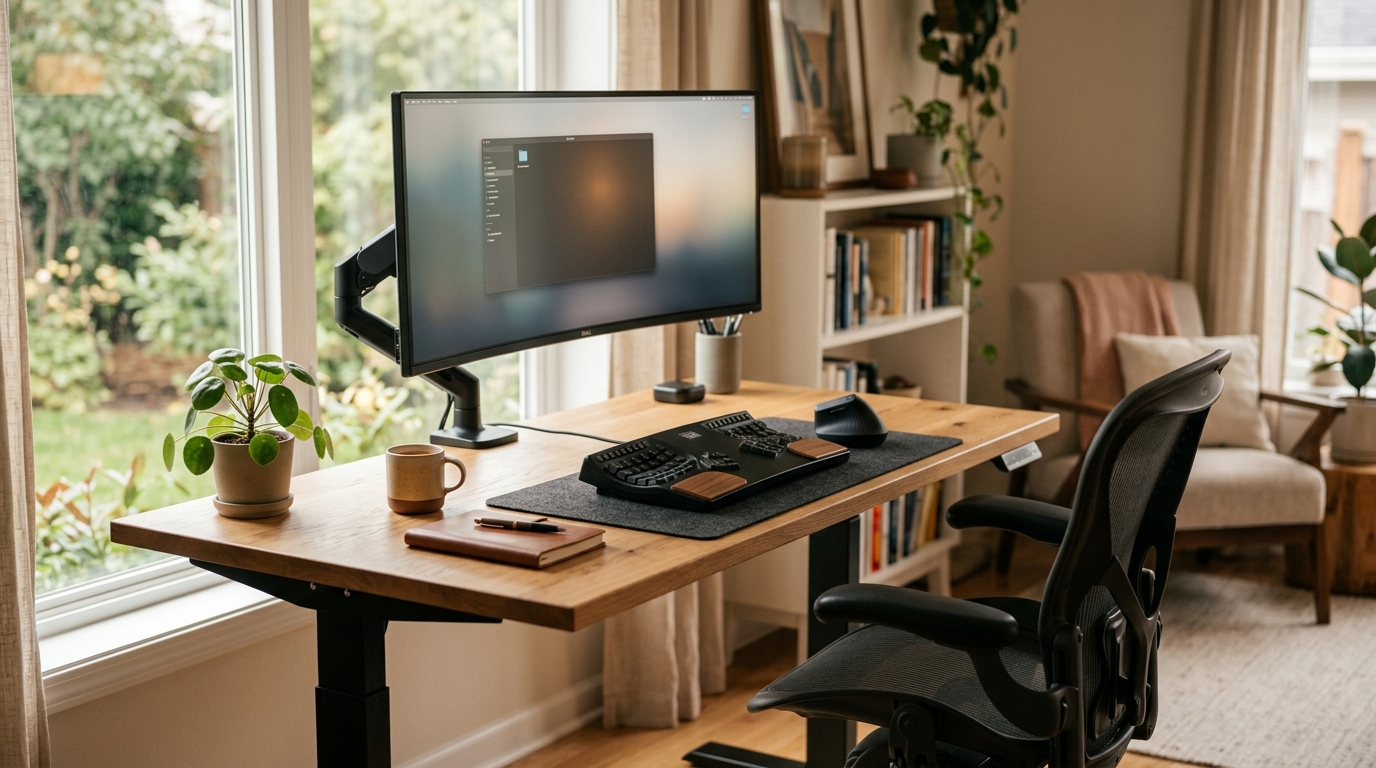
The Herman Miller Aeron is the best ergonomic chair for a complete desk setup, and the Ergotron LX monitor arm delivers the highest return of any single upgrade. Building from scratch: pair the Aeron with the Uplift V2 standing desk, mount the Ergotron LX arm, then add Logitech MX Keys S and MX Master 3S peripherals for a complete system.
Most desk pain and fatigue comes from the same structural errors repeated across setups: a chair that does not support lumbar curvature, a monitor at the wrong height forcing forward head tilt, a keyboard that extends the wrists upward, and no mechanism to change posture across an eight-hour day. The right ergonomic desk setup addresses all four at once — in priority order that maximizes each upgrade. This guide covers one best pick per category, chosen for proven ergonomic benefit, durability, and the right price-to-impact ratio for a setup used every day for years.
What makes an ergonomic desk setup actually work?
Five biomechanical principles govern every ergonomic desk setup, regardless of which specific products fill each role.
Eyes level with the top third of the monitor. When the screen sits too low, the head tilts forward. At 30 degrees of forward flexion, the cervical spine supports an effective weight of 40 pounds rather than the resting 10 to 12 pounds — a load that accumulates across every hour of screen time.
Elbows at 90 degrees with wrists neutral or slightly flexed. Keyboard position drives wrist angle. A keyboard with steep positive tilt creates a wrist extension angle that compresses the carpal tunnel during sustained typing. Zero to three degrees of incline keeps the wrist in the range where no sustained compression occurs.
Lumbar spine supported at the natural inward curve. A chair that flattens the lumbar or pushes support at the wrong height shifts spinal load from the vertebral bodies to the posterior ligaments — the two structures least suited to sustained loading.
Monitor distance set to 20 to 28 inches. Sustained focus at arm’s length requires continuous ciliary muscle contraction that causes the eyestrain and headache pattern known as computer vision syndrome. The correct distance removes that load.
Posture variation across the day. No static posture — however correct — eliminates the metabolic cost of sitting. A sit-stand desk provides the variation that converts a day of static loading into intermittent loading, which consistently reduces afternoon discomfort and fatigue.
Quick comparison
| Product | Best for | Rating | Notes | |
|---|---|---|---|---|
| Herman Miller Aeron | best ergonomic chair for all-day desk work | ★★★★★ | Three sizes (A/B/C). PostureFit SL lumbar. 8Z Pellicle mesh. $1,000 to $1,500 new; refurbished from $450. | Check price |
| Uplift V2 Commercial Standing Desk | best electric sit-stand desk for long work sessions | ★★★★★ | Height range 24 to 50 inches. 355 lb capacity. 15-year frame warranty. $700 to $1,200. | Check price |
| Ergotron LX Monitor Arm | best monitor arm for ergonomic screen height correction | ★★★★★ | Holds 7 to 25 lb. 13-inch height range. No tool required to reposition. $140 to $180. | Check price |
| Logitech MX Keys S | best low-profile ergonomic wireless keyboard | ★★★★★ | Zero to 3 degree incline. Scissor switches. USB-C. Connects to 3 devices. $90 to $110. | Check price |
| Logitech MX Master 3S | best ergonomic wireless mouse for desk work | ★★★★★ | Sculpted thumb rest. MagSpeed scroll. 8000 DPI. 70-day battery. USB-C. $90 to $110. | Check price |
The picks
Best ergonomic chair: Herman Miller Aeron
Best for anyone spending six or more hours per day at a desk who has not yet invested in a chair built to actual ergonomic specifications
Herman Miller Aeron Chair
The Herman Miller Aeron is one of the most studied ergonomic office chairs in the category, with independent occupational health research behind its design. Three sizes — Size A for smaller frames, Size B for average adults, Size C for larger frames — ensure the lumbar support height, seat depth, and armrest width are geometrically correct for the body rather than compromised by a one-size-fits-most design. The PostureFit SL mechanism adjusts both the lumbar and sacral region independently, which matters because most chairs support only one or the other. The 8Z Pellicle suspension mesh distributes pressure across the full seat surface, maintains airflow to prevent heat buildup, and does not compress over years of daily use the way foam does. At $1,000 to $1,500 new, the Aeron is the highest-cost pick in this guide — and the most justified, because it is in use every hour of every desk session.
★★★★★ 4.8 · 3,100 reviews
Check current price on Amazon→Pros
- PostureFit SL adjusts lumbar and sacral support independently for precise fit to individual spinal curve
- 8Z Pellicle mesh distributes pressure and maintains airflow without compressing like foam over time
- Three size options ensure correct lumbar height and seat depth for a wide range of body types
- Fully adjustable armrests move in four dimensions to support any keyboard or mouse position
- Genuine used and refurbished Aeron chairs available from $450 to $700 from authorized dealers
Cons
- $1,000 to $1,500 new is the highest upfront cost of any component in this setup
- Size selection matters — ordering without sitting in the chair first risks choosing the wrong fit
- Hard plastic frame components show wear and scuffing more visibly than fabric-covered alternatives
- The mesh back shows light surface pilling after 3 to 5 years of heavy daily use
Best sit-stand desk: Uplift V2 Commercial
Best for home office and professional users who want a stable electric sit-stand desk with a long warranty and high weight capacity
Uplift V2 Commercial Standing Desk
The Uplift V2 Commercial is the most trusted electric sit-stand desk between budget and ultra-premium. The double-crossbar frame stabilizes the tabletop across the full 24 to 50-inch height range — a span that accommodates seated use for anyone under 5 feet 2 inches and standing use for most users up to 6 feet 6 inches without external risers. A 355-pound weight capacity handles multi-monitor setups with desktop PCs and external drives without frame flex. The 15-year warranty on the motor and frame covers the structural components for the functional lifetime of most desk setups. Uplift offers 17 tabletop materials including bamboo, laminate, and solid hardwood so the surface matches existing furniture rather than defaulting to a generic finish. At $700 to $1,200 depending on configuration, it costs more than budget alternatives but less than Humanscale or Knoll options.
★★★★★ 4.7 · 8,400 reviews
Check current price on Amazon→Pros
- Height range of 24 to 50 inches covers all seated and standing positions without additional risers
- Double-crossbar frame stabilizes the top at full standing height with less wobble than competitors
- 355 lb weight capacity handles the heaviest multi-monitor and dual-PC desk configurations
- 15-year warranty on the frame and motor covers the lifespan of most desk setups
- 17 tabletop options allow surface selection to match existing furniture and room aesthetic
Cons
- List price of $700 to $1,200 is higher than budget electric desks in the $300 to $500 range
- Frame ships separately from the tabletop in most configurations — assembly takes 45 to 60 minutes
- Three-stage legs are more stable than two-stage but add 2 to 3 inches to the minimum desk height
- Programmable height presets require the advanced handset upgrade at additional cost on base models
Best monitor arm: Ergotron LX
Best for anyone whose monitor sits on its stock stand and whose screen top is more than 2 inches below eye level when seated
Ergotron LX Monitor Arm
A monitor arm is the highest-ROI single ergonomic upgrade for most desk setups. The monitor is the focal point of six to ten hours of daily visual attention, and most screens on stock stands sit 3 to 6 inches below eye level — a gap that translates into measurable cervical fatigue over full-day sessions. The Ergotron LX corrects that gap with a 13-inch height adjustment range, plus full tilt, pan, and rotation, without tools. The internal spring tension holds any position without drift over years of daily repositioning. At $140 to $180, the Ergotron LX costs roughly 10 percent of the price of a monitor upgrade and delivers equal ergonomic benefit by correcting the height of the screen you already own. It also reclaims the desk footprint occupied by the fixed stand and creates under-arm space for a laptop or peripheral.
★★★★★ 4.7 · 14,200 reviews
Check current price on Amazon→Pros
- Corrects monitor height to eye level without a riser, freeing the footprint under the arm for other use
- 13-inch height adjustment range covers ergonomic corrections for both seated and standing desk positions
- Spring tension holds any tilt and height position without drift — no tool required to reposition
- Supports monitors up to 25 lb, covering all standard monitors up to 32 inches in most configurations
- At $140 to $180, delivers the highest ergonomic return per dollar of any single upgrade in this guide
Cons
- Supports up to 25 lb — large 38-inch and 49-inch ultrawide monitors may require the heavier Ergotron HX
- Requires a desk surface at least 1 inch thick for the C-clamp mount — thin tabletops need a grommet mount
- The arm extends 20 inches from the post, which may overcrowd a small or narrow desk surface
- Single-arm version only — users who need dual-arm coverage require two separate units
Best ergonomic keyboard: Logitech MX Keys S
Best for desk workers who type for several hours daily and want a low-profile keyboard that maintains wrist neutral position without requiring a separate wrist rest
Logitech MX Keys S Wireless Keyboard
Keyboard angle is the most overlooked ergonomic variable in most desk setups. A keyboard with steep positive tilt requires wrist extension — an upward bend — that compresses the carpal tunnel during sustained typing. The Logitech MX Keys S sits at 0 to 3 degrees of incline, low enough that most users maintain a neutral wrist position during active typing without a separate rest. Scissor-switch keycaps provide 1.8mm of key travel with a firm, quiet actuation that reduces finger fatigue compared to membrane alternatives. Spherically dished key surfaces create a tactile registration point per keystroke that improves accuracy on long typing sessions. USB-C charging and three-device Bluetooth pairing means switching between workstation and laptop takes one keystroke. At $90 to $110, it delivers the best ergonomic-to-price ratio in the wireless keyboard category for standard desk work.
★★★★★ 4.6 · 6,700 reviews
Check current price on Amazon→Pros
- Zero to 3 degree incline keeps the wrist in neutral position during typing without a separate wrist rest
- Spherically dished keycaps provide tactile precision per keystroke that improves accuracy over long sessions
- Scissor switches deliver 1.8mm of key travel with quiet actuation suitable for open office environments
- Three-device pairing via USB-C receiver or Bluetooth — switches between devices in one keystroke
- USB-C charging with approximately 10-day battery life for most typical daily usage levels
Cons
- No split or tented layout for users with pronounced pronation strain who need a more aggressive correction
- Backlight brightness on the Keys S is improved over the original but drains battery faster when active
- The function row defaults to media controls — F-key access requires a function lock key toggle
- Not mechanical — users accustomed to mechanical switches and longer key travel will notice the difference
Best ergonomic mouse: Logitech MX Master 3S
Best for desk workers who use a standard mouse form factor for extended sessions and want reduced forearm tension without switching to a vertical mouse
Logitech MX Master 3S Wireless Mouse
The thumb rest and sculpted grip of the MX Master 3S allow the hand to maintain a natural lateral rotation rather than a flat palm-down pronation. Sustained pronation loads the forearm flexor tendons across long mousing sessions and contributes to the forearm fatigue pattern that often precedes repetitive strain injury. The MX Master shape reduces that load without requiring the adjustment period of a vertical mouse transition. The MagSpeed electromagnetic scroll wheel switches between click-per-line precision and free-spin document traversal with a single side-to-side thumb gesture. At 8000 DPI sensitivity and 70 days of battery life on a single USB-C charge, it handles both fine precision work and fast multi-monitor pointer travel equally well. The MX Master series has earned a consistent position as the best ergonomic mouse for users who want meaningful shape improvement without adopting a fully vertical form factor.
★★★★★ 4.7 · 19,600 reviews
Check current price on Amazon→Pros
- Thumb rest and sculpted grip reduce forearm pronation load compared to flat symmetric mice
- MagSpeed electromagnetic scroll wheel switches between precision ratchet and free-spin modes
- 8000 DPI sensitivity covers precision design work and fast multi-monitor pointer movement equally well
- 70-day battery life on USB-C charge removes the low-battery concern common with wireless peripherals
- Multi-device pairing via Logi Bolt USB receiver or Bluetooth — switches between computers in one press
Cons
- Right-hand-only shaping makes it unsuitable for left-handed users without a separate left-hand option
- At $90 to $110, it costs more than basic wireless mice that serve the same functional role
- The thumb rest position is fixed and may not suit users with very small hands who cannot reach it naturally
- Charges only by USB-C cable — no dock — which requires the cable to remain accessible at the desk
How to build the setup in the right order
The sequence matters as much as the component selection. Building in the wrong order makes each subsequent purchase less effective.
1. Chair first. The chair determines posture for every hour at the desk. A correct chair with lumbar support at the right height, armrests at elbow level, and seat depth set to two to three finger-widths from the back of the knee is the postural foundation everything else builds on. Without it, monitor height corrections and keyboard angle adjustments are partial solutions applied to a broken baseline.
2. Monitor arm second. Once the chair height and posture are correct, the monitor arm corrects the most common downstream ergonomic error: screen below eye level. Set the monitor top to eye level, push it to arm’s length (22 to 26 inches for most users), and tilt it 10 to 20 degrees back for a comfortable gaze angle. This step requires no new furniture — just the arm and the correct position.
3. Sit-stand desk third. A sit-stand desk provides the posture variation that no static setup can replicate. Once the seated ergonomics are correct, standing intervals remove the health ceiling of all-day sitting. Target a 60/40 or 70/30 sit-to-stand ratio — standing more than six continuous hours creates its own fatigue load.
4. Keyboard and mouse last. Peripheral ergonomics matter, but they matter much less when the postural and screen position foundation is wrong. Once the chair, monitor, and desk height are dialed in, the keyboard and mouse close the remaining ergonomic gap at the wrist and forearm level.
What to skip
Gaming chairs marketed as ergonomic. Gaming chairs with high winged backs, aggressive lumbar bolsters, and racing-bucket aesthetics are engineered for visual brand association rather than posture mechanics. The high wing back forces the upper spine into a position incompatible with standard desk work. The built-in lumbar pillow is fixed rather than adjustable to individual spinal curvature. Steelcase, Herman Miller, Haworth, and Humanscale build to occupational health specifications; gaming chair brands do not.
Budget ergonomic chairs under $200. A chair in the $80 to $200 range that markets itself as ergonomic typically offers a fixed lumbar bump and adjustable seat height as its entire ergonomic feature set. The foam compresses within 6 to 18 months, eliminating whatever support existed. Budget toward a used or refurbished premium chair before buying a new cheap one.
Wrist rests used during active typing. Wrist rests are for parking palms between typing bursts, not for pressing against during active keystrokes. Using a wrist rest as a contact surface during typing creates a fulcrum that increases wrist extension angle rather than reducing it. Use the wrist rest as a parking surface between bursts; during active typing, keep the wrist floating freely above the keys.
FAQ
Frequently asked questions
What is the most important part of an ergonomic desk setup?
Do I need both a sit-stand desk and an ergonomic chair?
How high should my monitor be for an ergonomic setup?
Is the Herman Miller Aeron worth the price?
What is a realistic budget for a complete ergonomic desk setup?
Can I use the Ergotron LX with an ultrawide monitor?
Bottom line
The Herman Miller Aeron is the best ergonomic chair, the Uplift V2 Commercial is the best sit-stand desk, and the Ergotron LX monitor arm delivers the highest return per dollar of any single upgrade for most existing setups. Layer the Logitech MX Keys S and MX Master 3S on top for complete peripheral ergonomics. Build in order: chair, monitor position, desk height, keyboard and mouse — each step makes the next one more effective.
For the complete ergonomic workspace: ergonomic workstation setup guide, best office chairs for back pain, best standing desks, monitor height guide.