roundups
Best Cable Management Kits of 2026 (Clean Up Your Desk for Good)
Best cable management kits of 2026: under-desk trays, cable raceways, braided sleeves, and cable boxes to eliminate desk clutter.
 Daniel Osei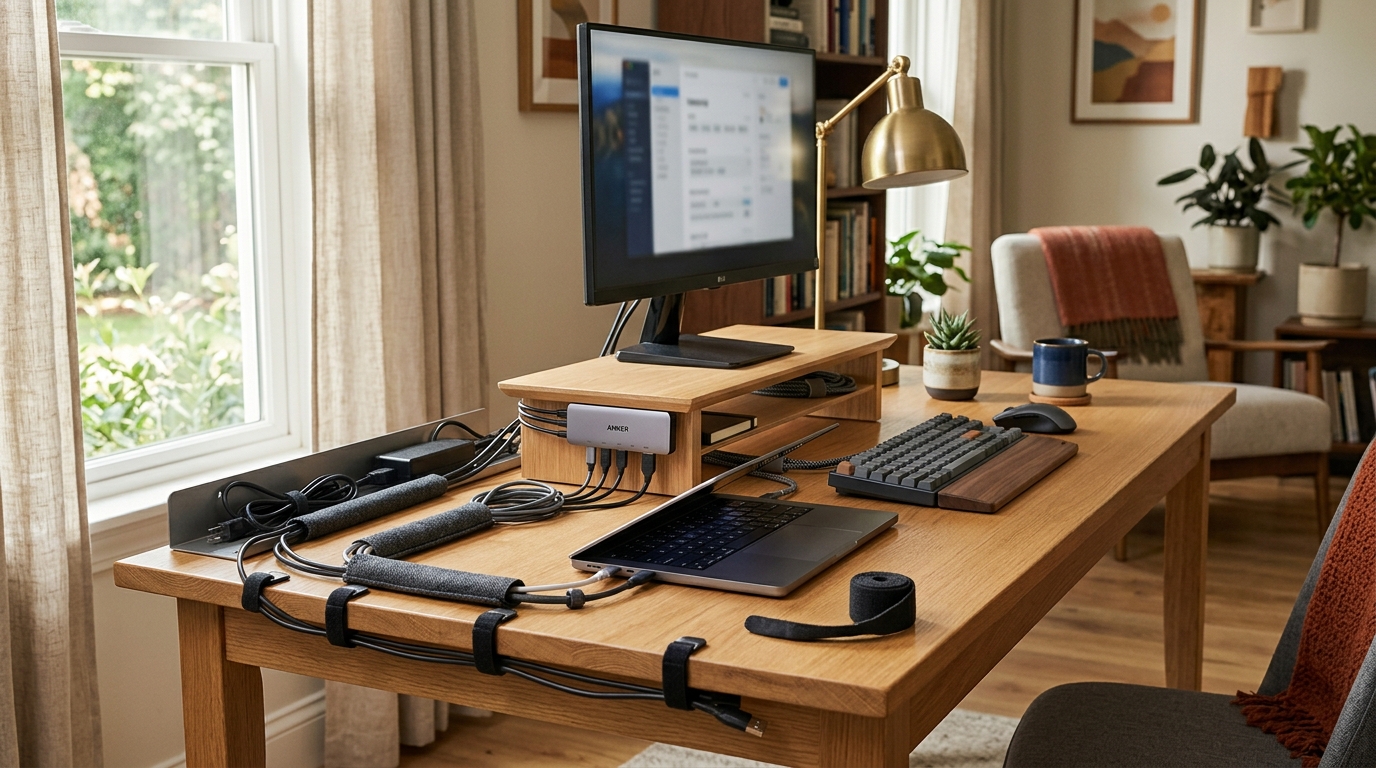
The average home-office workstation has six to ten cables — monitor, PC or laptop power, USB hub, keyboard, mouse, speakers, webcam, and a phone charger — all converging on a power strip somewhere on or under the desk. Left unmanaged, those cables create three real problems: visual noise that makes the desk feel cluttered regardless of how clean everything else is; tangles that require a full desk reorganization every time you move one device; and a dust-collection surface that makes routine cleaning a ten-minute untangling project. None of this is inevitable.
Cable management is a solvable problem, and it’s cheaper to solve than most people expect. The category spans everything from $6 velcro ties to $60 under-desk cable tray systems, but the practical sweet spot for most setups is $30–70 in total across a couple of complementary products. The key is understanding which tool addresses which problem: a cable sleeve groups cables running across open desk space, a J-channel raceway hides cables along the desk edge, a cable box conceals a power strip and its adapters, and velcro ties keep bundles from re-tangling. Comprehensive kits that bundle multiple types together deliver the best value when you’re starting from scratch.
How we picked
A cable management product has one job: remove cables from visible, accessible surfaces and route them through or into something clean and stable. We evaluated these criteria:
- Problem specificity. The best cable management tools target one problem well rather than all problems poorly. A comprehensive kit is valuable only if it includes tools that solve your actual problems. We preferred solutions with clear, specific use cases over generic assortments that pad the piece count with items you won’t use.
- Installation commitment. Some cable management solutions require drilling, wall anchors, or adhesive that damages surfaces on removal. Others are entirely non-destructive (velcro ties, peel-and-stick cable clips, desktop cable boxes). We noted the installation method for each pick, since rental-office and temporary setups have different constraints than permanent home offices.
- Cable capacity. Most budget raceways and sleeves are designed for 3–5 cables and will be tight, stiff, or visually bulging with 7–8 real cables. We prioritized solutions realistically sized for actual home-office cable counts.
- Reusability and adjustability. A cable management system that locks you in permanently is a liability every time you upgrade a device or rearrange the desk. We favored solutions that allow cables to be added, removed, or rerouted without scrapping the whole setup.
- Aesthetics and finish. Black and white cable management tends to disappear against desk and wall surfaces better than gray or multi-color. Clean edges and consistent widths matter — mismatched raceways at different widths look unfinished even when cables are fully hidden.
Quick comparison
| Product | Best for | Rating | Notes | |
|---|---|---|---|---|
| AULLOV 157-Piece Cable Management Kit | best overall — comprehensive kit with velcro ties, cable clips, labels, and sleeves | ★★★★★ | $18–28. Includes 8 types of cable organizers. Best value for full new setups. | Check price |
| Alex Tech Braided Cable Management Sleeve (4-pack) | best cable sleeve — split-loom braided tube for bundling open cable runs | ★★★★★ | $12–18 for 4-pack. Split loom lets you add/remove cables without replacing. Multiple diameters. | Check price |
| J Channel Cable Organizer (under-desk raceway kit) | best under-desk raceway — routes cables at desk edge and drops them cleanly to the floor | ★★★★★ | $18–30 for 4×15" channels. Adhesive or screw mount. Available in black or white. | Check price |
| D-Line Cable Management Box | best cable box — encloses a full power strip and excess cable length in a ventilated enclosure | ★★★★☆ | $25–40. Holds a 6-outlet power strip. Ventilated sides. Multiple cable entry/exit points. | Check price |
| VELCRO Brand One-Wrap Thin Ties | best velcro ties — thin, reusable, adjustable for ongoing cable maintenance | ★★★★★ | $8–14 for 100-count. 8" length. No tools, no surface damage. Reusable indefinitely. | Check price |
| Cheap no-brand adhesive cable clips | nothing — adhesive backing peels off smooth surfaces within weeks | ★★★☆☆ | No-brand clips fail on laminate, glass, and painted surfaces within 30 days. Skip. | Check price |
The picks
Best overall comprehensive kit: AULLOV 157-Piece Cable Management Kit
Best for setting up cable management from scratch — includes the broadest range of tool types to address multiple cable problems at once
AULLOV 157-Piece Cable Management Kit
A cable management kit that bundles multiple tool types only justifies the price if it includes tools you'll actually use, in quantities that match a real desk setup. The AULLOV kit ships with velcro cable ties, reusable cable clips, cable labels, hook-and-loop strips, spiral cable wrap, and braided sleeve sections — enough variety to address open cable runs, cable-to-desk routing, and basic bundling in a single order. At $18–28, it costs less than most single-type cable management products purchased individually. The practical limitation is that a generalist kit includes smaller quantities of each type than a dedicated product — you get enough velcro ties to organize your setup, not enough to do a server rack. For a single home-office desk starting from zero, the variety is exactly the right trade.
★★★★★ 4.6 · 22,800 reviews
Check current price on Amazon→Pros
- 8 cable management types in one box — addresses multiple cable problems without additional orders
- At $18–28, cheaper than buying velcro ties, cable clips, and sleeves separately
- Includes cable labels — underrated for identifying cables at a glance without tracing them
- Mix of permanent zip ties and reusable velcro types for different application needs
- Good starting point for anyone setting up a new desk or reconfiguring an existing one from scratch
Cons
- Smaller quantity of each type than a dedicated single-type purchase — may run short on specific items for a large desk
- Spiral cable wrap is the lowest-utility item; it looks dated and catches dust at the helix gaps
- Cable sleeve lengths in the kit are shorter than dedicated 4-pack sleeve products; may not cover long cross-desk runs
- Zip ties included are adequate but not premium — buy a dedicated pack for any high-tension or weight-bearing use
Best cable sleeve: Alex Tech Braided Cable Management Sleeve
Best for bundling multiple cables running across open desk space — turns a tangle of 4–6 parallel cables into a single clean bundle
Alex Tech Braided Split Cable Management Sleeve (4-Pack)
A braided split-loom sleeve does one thing: it turns multiple parallel cables running along the same path into a single visually unified bundle. The 'split' means there's a lengthwise slit along the sleeve — you press cables in through the slit rather than threading them end-to-end, so you can add or remove individual cables without replacing the sleeve. Alex Tech's version uses expandable braided polyester that accommodates different cable diameters, resists fraying better than plain PET alternatives, and maintains a consistent shape under normal desk conditions. The 4-pack gives enough total length to cover the cable run from a desk-mounted monitor down to a floor-level power strip with material to spare. The key buying decision is diameter: measure your cable bundle when compressed slightly, then choose the 1/4-inch, 1/2-inch, or 3/4-inch variant that fits comfortably without stretching.
★★★★★ 4.5 · 31,400 reviews
Check current price on Amazon→Pros
- Split-loom construction lets you add or remove cables from the bundle without replacing the sleeve
- Expandable braided material accommodates varying cable diameters along the same run
- Cleaner appearance than spiral wrap — consistent outside diameter, no visible gaps between wraps
- Available in multiple diameter variants (1/4", 1/2", 3/4") for different cable bundle sizes
- 4-pack provides enough coverage for a full desk cable run in most home-office setups
- Flame-retardant polyester braiding meets basic safety standards for enclosed cable management
Cons
- Braided exterior collects dust at the braid openings over time — blows clean but needs periodic attention
- The split slit can open slightly if the sleeve is bent at a sharp angle, exposing the cables inside
- Does not hold a 90-degree corner shape — pair with a cable clip to maintain corner routing
- Longer cable runs may require multiple sleeve lengths with a visible overlap joint at each splice point
Best under-desk raceway: J Channel Cable Organizer
Best for routing the vertical cable drop from desk surface to floor cleanly, and bundling cables along the underside of the desk edge
J Channel Cable Management Raceway (Under-Desk Kit, 4-Pack)
The J-channel raceway addresses the most common visible cable problem in home offices: the loose vertical cable run from desk height down to a power strip on the floor. Even with a clean desk surface, cables draping visibly down the desk legs undermine the whole setup. A J-channel mounts to the underside of the desk edge — adhesive pads or small screws — and provides a raceway that routes power cables, monitor cables, and other drops cleanly along the desk structure to a single exit point near the power strip. Each channel segment is typically 15 inches; connect them end-to-end to cover your full desk edge. Practical installation takes about 20 minutes and requires no tools if you use the adhesive backing. Buy enough total length to cover the desk perimeter you're routing, plus a 20% buffer for the segments you'll trim at corners and ends.
★★★★★ 4.5 · 18,900 reviews
Check current price on Amazon→Pros
- Addresses the highest-visibility cable problem: the hanging cable drop from desk surface to floor
- Peel-and-stick adhesive backing requires no drilling and works on wood, laminate, and metal desk surfaces
- Open J-channel design lets cables be added or removed without dismounting the raceway
- Available in black and white — black nearly disappears against a dark desk or floor
- Snap-on cover (on covered variants) encloses cables completely when you are not reconfiguring
Cons
- Adhesive pads may not hold on particleboard or MDF desk undersides — test before loading fully
- J-channel capacity is limited: 6–8 standard cables fit comfortably; more than that requires a wider cable management approach
- Corner connectors are typically sold separately; 90-degree desk corners need an additional fitting
- Once adhesive is placed and cables loaded, repositioning the raceway requires removing all cables first
Best cable box: D-Line Cable Management Box
Best for hiding a power strip, surge protector, and the tangle of adapter cables that collect around it — the highest cable-density problem area in most home offices
D-Line Cable Management Box (Power Strip Enclosure)
The power strip is the single densest cable point in any home-office setup: six to eight plug-in adapters, each with a different cable gauge and length, all in a 6-inch radius. A cable box encloses the entire power strip inside a ventilated enclosure that allows heat dissipation while hiding every plug and adapter from sight. D-Line's version fits a full 6-outlet surge protector with room for the immediate cable slack, has multiple cable entry and exit ports at each end sized for 4–6 cables simultaneously, and comes in black or white to match desk color. The lid lifts off for access when you need to add or remove plugs. This single product delivers the most dramatic before/after transformation in most setups — a tangled power strip becomes an invisible box, and the wiring complexity it hides is immediately striking.
★★★★☆ 4.4 · 14,600 reviews
Check current price on Amazon→Pros
- Hides the highest cable-density point in any desk setup — power strip plus all plug adapters in one enclosure
- Ventilated sides maintain airflow for a power strip loaded with adapters generating heat
- Multiple cable entry and exit ports at both ends allow clean routing in and out
- Lift-off lid provides full access for adding or removing plugs — no disassembly required
- Available in black and white; sits on a desk surface or on the floor directly under a desk
Cons
- Sized for standard 6-outlet strips; wide surge protectors or desktop power stations may not fit inside
- Does not mount to a surface — sits in place; a determined kick or desk bump can dislodge it
- Does not eliminate the cable runs leading to the box — pair with J-channel or braided sleeve for a complete solution
- High-wattage devices inside a cable box generate more heat — check device output before enclosing anything above 100W continuous
Best velcro ties: VELCRO Brand One-Wrap Thin Ties
Best for quick, reusable cable bundling — the single most-used product in any cable management setup because it accommodates every future change
VELCRO Brand One-Wrap Thin Ties (100-Count, 8-inch)
Velcro ties are the most-reused product in any cable management setup because they accommodate change. Where zip ties require cutting when you add a cable or swap a device, velcro one-wraps open, reclose, and reopen indefinitely without losing grip. The VELCRO Brand One-Wrap 8-inch thin ties are the category standard: long enough to wrap a bundle of 6–8 standard cables once with a secure tail, narrow enough to not bunch visibly when folded, and made with hook-and-loop material that maintains grip through hundreds of open/close cycles — unlike no-brand knockoffs that lose grip within a month of regular use. At $8–14 for 100 ties, a single pack is enough to organize a desk, manage cables on a monitor arm, and have plenty left for cable organizing elsewhere in the home.
★★★★★ 4.7 · 47,200 reviews
Check current price on Amazon→Pros
- Reusable indefinitely — no cutting required when adding, removing, or swapping cables
- 8-inch length handles a bundle of 6–8 cables in one wrap without requiring multiple ties
- Thin profile folds flat when not in use; does not bunch or create visible lumps on the cable run
- VELCRO Brand hook-and-loop maintains grip through hundreds of open/close cycles
- 100-count pack covers a full desk setup with plenty left over
Cons
- Thin ties can stretch slightly if used to restrain cables under tension — use the wider One-Wrap for heavy cable bundles
- Most packs are black only; white or color options exist but are harder to find at this price point
- Ties bundle cables but do not hide them — pair with a sleeve or raceway for fully concealed runs
What to skip
Cheap no-brand adhesive cable clips. The adhesive on no-brand cable clips is the defining failure point of this category. Clips applied to smooth painted, laminate, or glass surfaces will hold for a few days and then release as the adhesive weakens under the slight tension of a cable. You will spend more time re-applying fallen clips over six months than the $3 you saved on the pack. 3M Command adhesive cable clips cost $1–2 more and stay where you put them.
Spiral cable wrap. Spiral wrap was the standard cable management solution in the 1990s and still ships in many kit bundles as filler. The loose helix construction has visible gaps between each wrap, catches dust in those gaps, and unwraps at the ends over time. Braided split-loom sleeve does everything spiral wrap does, looks far cleaner, and costs roughly the same. When you see spiral wrap in a kit, treat it as padding rather than a useful component.
Narrow cable raceways under 1 inch wide. Small-diameter raceway designed for a single cable has an obvious use case that real home-office installs almost never match. Sold at the lowest price point, they look reasonable in photos and fail immediately when you discover your monitor cable alone approaches their capacity. For desk-edge cable routing with real cable counts, buy a raceway with at least 1 inch interior width — ideally 1.5–2 inches for a full workstation’s worth of cables.
No-brand velcro cable straps. Name-brand VELCRO and similar hook-and-loop materials use a specific filament density that maintains grip across hundreds of open/close cycles. Generic equivalents have coarser loops that lose grip within weeks of regular use. At $1–2 more per 100-count pack, brand-name velcro cable ties are worth every penny for any product you open and close repeatedly.
FAQ
Frequently asked questions
What is the best first step when starting cable management from scratch?
Should I use velcro ties or zip ties for cable management?
How do I hide cables on a sit-stand desk?
Can I use cable management on a glass or white desk without marking the surface?
How many cables fit in a J-channel desk raceway?
What is the difference between a cable tray and a cable raceway?
How do I prevent cable management from becoming a mess again after six months?
Bottom line
Best comprehensive starting kit: AULLOV 157-Piece Cable Management Kit at $18–28 — the widest tool variety for setting up a new desk or reconfiguring an existing one. Best for visible cable runs: Alex Tech Braided Cable Sleeve 4-Pack at $12–18, turning parallel cable tangles into a single clean bundle. Best for the desk edge and floor drop: a J Channel Cable Organizer at $18–30 for a 4-channel kit. Best for hiding the power strip: D-Line Cable Management Box at $25–40. Best for ongoing maintenance: VELCRO Brand One-Wrap Thin Ties at $8–14, reusable indefinitely and worth buying regardless of what else you choose.
Skip unbranded adhesive clips, spiral cable wrap, and any raceway under 1 inch wide — none hold up through real-world use long enough to justify the desk disruption when they fail.
Complete the setup: standing desks for sit-stand cable flexibility considerations, desk lamps to eliminate one more power-strip occupant with a USB-powered monitor light bar, monitor arms if mounting your display frees up a cable run you currently manage over the desk surface, or the full ergonomic office setup guide.